

We are pleased to announce Synex Server 13 R5, an update that represents a significant advancement in synex-installer's storage capabilities. This release is the result of an exhaustive development and testing process, focused on delivering enterprise-grade storage configurations for all supported filesystems.
Complete transition to synex-installer
With this release, Synex Server completes its transition to synex-installer as the sole installation system, definitively replacing the traditional Debian Installer. This decision consolidates the unified installation experience we began building in R1 with synex-zfs-installer and expanded in R2 with multi-filesystem support. Administrators now have a single coherent installation flow, regardless of the filesystem or storage configuration chosen.
synex-installer: new enterprise storage capabilities
synex-installer 2.6.0 represents the most significant installer update since its introduction in R2. This version incorporates full support for software RAID (mdadm) in ext4 and XFS installations, independent LVM and LUKS2 encryption options that allow any combination based on each deployment's requirements, and automatic cleanup mechanisms that ensure clean installations even when reusing disks with previous configurations. Additionally, this version includes important fixes for ZFS installations and improvements to automatic boot redundancy synchronization.
Software RAID: enterprise storage for ext4 and XFS
The central feature of this release is the incorporation of software RAID (mdadm) for ext4 and XFS installations. Until now, advanced multi-disk configurations were reserved for ZFS with its native topologies. R5 removes this limitation, offering administrators who prefer traditional filesystems the same redundancy and performance possibilities.
Supported RAID levels:
- RAID0 (stripe): maximum performance and capacity, no redundancy
- RAID1 (mirror): complete redundancy, ideal for critical systems
- RAID5: balance between capacity and fault tolerance (1 disk)
- RAID6: greater protection with 2 simultaneous failure tolerance
- RAID10: combination of performance and redundancy for intensive workloads
Each level can be combined with LUKS2 for full storage encryption and LVM for flexible volume management, resulting in configurations like RAID → LVM or RAID → LUKS → LVM according to each deployment's security requirements.
Updated filesystem selection menu
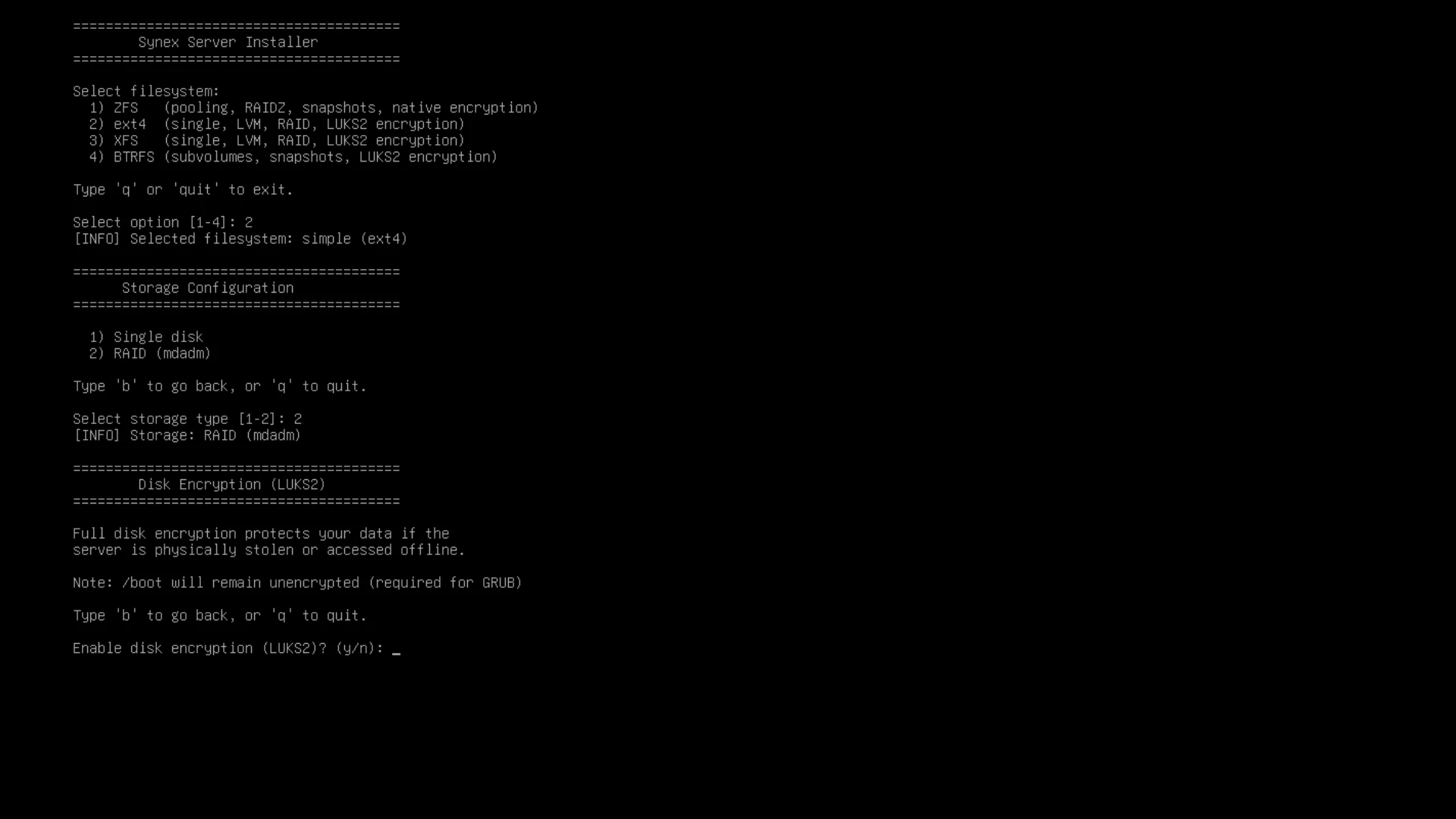
The installer's initial menu reflects the new capabilities with precise descriptions:
Select filesystem:1) ZFS (pooling, RAIDZ, snapshots, native encryption)2) ext4 (single, LVM, RAID, LUKS2 encryption)3) XFS (single, LVM, RAID, LUKS2 encryption)4) BTRFS (subvolumes, snapshots, LUKS2 encryption)
Complete boot redundancy
RAID1, RAID5, RAID6 and RAID10 configurations implement automatic boot redundancy. The installer creates /boot/efi (RAID1) and /boot (RAID1) partitions distributed across all disks, installing GRUB on each EFI partition. If any disk fails, the system can boot from the remaining disks without manual intervention.
This architecture follows the same principle implemented for ZFS in previous versions, now extending protection to the full spectrum of supported filesystems.
Standalone LVM for single disk
R5 introduces a new storage option: LVM without encryption for single disk installations. This configuration allows administrators to leverage LVM's volume management capabilities—dynamic resizing, snapshots, thin provisioning—without the encryption overhead when it's not a requirement.
The storage configuration menu now presents independent options for LUKS and LVM, allowing any combination according to each server's specific needs.
Automatic cleanup of previous configurations
During the development of RAID functionality, we identified scenarios where orphaned superblocks from previous installations could persist on unselected disks, resulting in "ghost" arrays visible in the installed system. R5 implements automatic cleanup of inactive RAID metadata using wipefs, with multiple verification passes during the installation process to ensure clean storage state.
ZFS installation improvements: correct mounting and automatic kernel synchronization
This version includes important fixes for ZFS installations that resolve an issue where /boot and /boot/efi partitions did not mount correctly after system reboot. The installer now generates the corresponding entries in /etc/fstab, ensuring automatic mounting on every boot.
Additionally, synex-boot-redundancy 1.1.0 incorporates a kernel hook that automates /boot and /boot/efi synchronization across all ZFS pool disks whenever a kernel is installed or updated. This eliminates the need to manually run synchronization after updates, maintaining boot redundancy without administrator intervention.
Interface and user experience improvements
R5 incorporates multiple improvements to the installation experience. The installer now offers optional user creation during the process, with username validation and automatic sudo group membership. Navigation includes consistent back and quit options throughout the configuration flow, with an installation summary before final confirmation. Disk display format has been unified across all filesystem options, and CTRL+C has been disabled after confirming installation to prevent accidental interruptions during critical partitioning operations.
Critical security fix in synex-control
This update includes synex-control 1.2.2 with an important security fix in the firewall module. The previous version exhibited incorrect behavior where the default policy was configured as 'accept' instead of 'drop', and ports remained accessible even after closing them.
The fix ensures the firewall policy works as expected: deny by default, allow explicitly. We recommend immediate update for all users utilizing the synex-control firewall module.
synex-repo-manager update
synex-repo-manager, the external repository management tool introduced in R3, receives updates that expand its coverage with support for NGINX and Caddy repositories.
Preconfigured repositories now include: Docker, Grafana, NGINX, Caddy, PHP Sury, PostgreSQL PGDG, Webmin and Zabbix.
System updates
This version incorporates all cumulative updates from Debian Trixie up to the build date, including security patches and kernel updates.
Availability and download
Synex Server 13 R5 is available for immediate download. As always, we recommend verifying checksums before creating the installation media.
Download Synex Server 13 R5 here.