

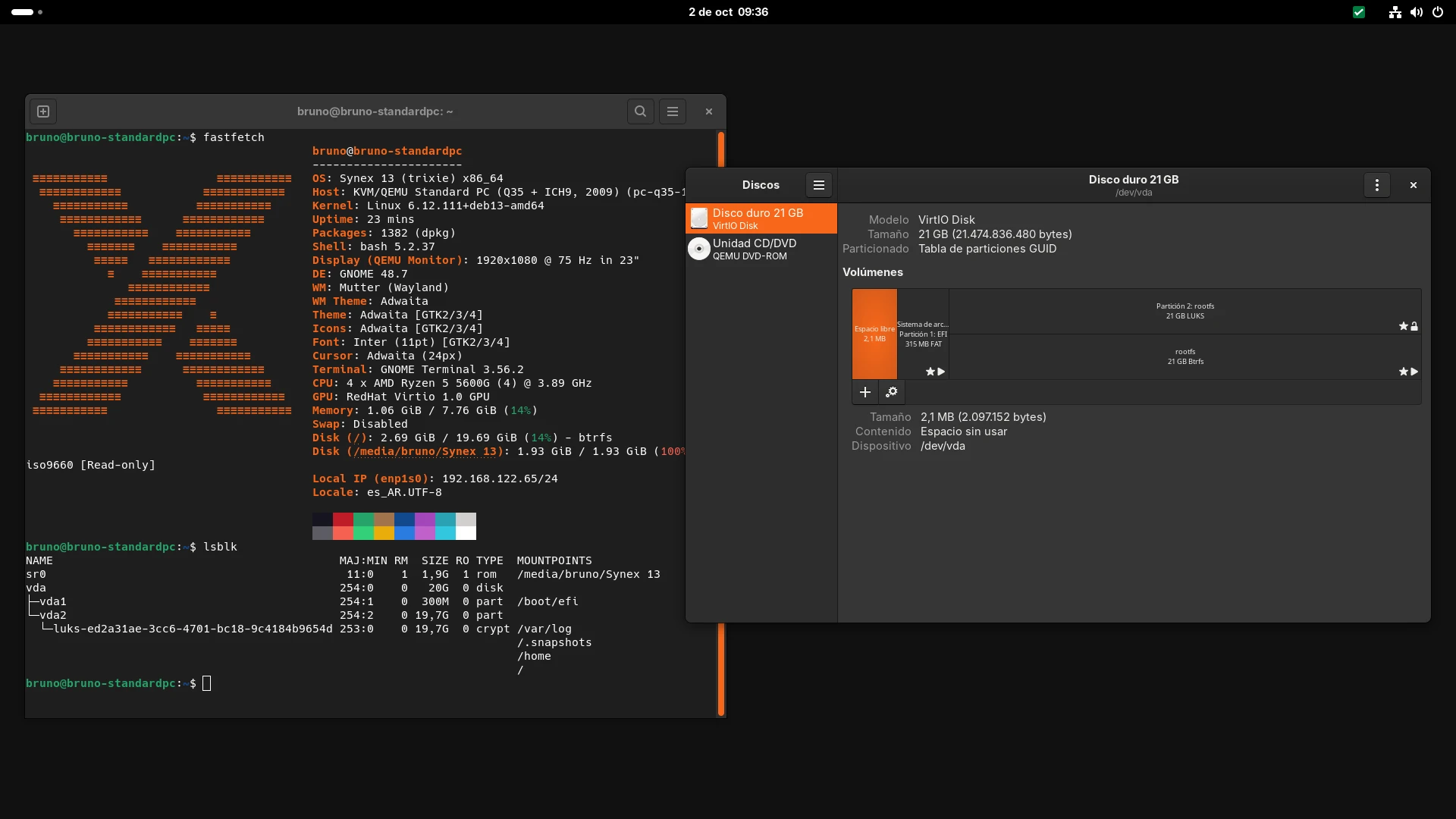
We are pleased to announce the release of Synex 13 u13. This update includes a particularly important technical change: Synex 13 moves from GRUB 2.12 to GRUB 2.14, through a backport maintained for this release.
The change goes beyond the bootloader itself. With this new base, we were able to revisit Calamares' encrypted installation scheme and remove a limitation that had until now constrained the partitioning design: GRUB can directly unlock LUKS2 volumes protected with Argon2id, so /boot no longer needs to remain outside the encrypted system.
At the same time, we reviewed the composition of the images to maintain a cleaner and more consistent base across editions, and rebuilt IceWM around the same principle while deliberately preserving its role as the smallest edition in the project.
GRUB 2.14 comes to Synex 13
Debian 13 Trixie uses GRUB 2.12 as its main version. For Synex 13 u13, we produced a backport of GRUB 2.14-3 while maintaining compatibility with the Trixie base.
The complete family used by Synex is distributed as:
2.14-3~bpo13+synex1
and includes the common components, amd64 UEFI support, EFI modules, support for BIOS installations, and the binaries required to generate the images.
The most important change for Synex is GRUB 2.14 support for LUKS2 with Argon2id.
Until now, an encrypted installation had an important restriction: although Linux and cryptsetup natively use LUKS2 and Argon2id, GRUB 2.12 could not directly unlock such a volume during boot. As a result, /boot had to remain on a separate unencrypted partition so GRUB could access the kernel and initramfs.
With GRUB 2.14, that limitation is gone.
An encrypted Btrfs installation can now use a much simpler layout:
ESP
└── LUKS2 Argon2id
    └── Btrfs
        ├── @
        ├── @home
        ├── @log
        └── @snapshots
/boot is part of the root subvolume and therefore remains inside the encrypted volume.
This also brings a direct advantage for Synex Snapshots: the kernel and initramfs once again belong to the same system state captured by snapshots, without depending on an external /boot partition.
Secure Boot remains available
The backport also had to solve another point: Secure Boot. Simply compiling GRUB 2.14 for Trixie is not enough, because an EFI executable rebuilt by Synex does not carry Debian's signature and therefore cannot be automatically accepted by Shim under Secure Boot.
To preserve that chain of trust, Synex's grub-efi-amd64-signed package uses Debian's official GRUB 2.14 EFI executables, signed by Debian and left unmodified, while adapting only the packaging and dependencies required to integrate them with the rest of the backport used by Synex 13.
During development, we verified the resulting executables byte for byte against Debian's signed originals and then validated the complete flow on an actual installation.
The result was tested with:
Secure Boot enabled
LUKS2
Argon2id
Btrfs
/boot inside the encrypted root
The upgrade from an existing Synex 13 installation running GRUB 2.12 to GRUB 2.14 was also validated using the Synex package repository. The complete family upgrades through APT or Synex Package Manager, regenerates the configuration, and reboots normally with the new version.
Calamares: LUKS2, Argon2id, and a single password prompt
calamares-settings-synex advances to version 1.0.32 in u13. The introduction of GRUB 2.14 allowed us to revisit the encrypted installation flow and remove the special handling that had been necessary to work around the limitations of the previous bootloader.
Calamares now integrates the luksbootkeyfile module into the installation sequence and runs it before generating fstab and crypttab. On an encrypted installation, GRUB requests the password required to unlock the LUKS2 volume and access /boot. From that point on, the initramfs can use the keyfile prepared during installation to continue booting without asking the user for the same password again. The result is a single password prompt during boot.
We also corrected GRUB configuration generation so that GRUB_ENABLE_CRYPTODISK is enabled only when the layout actually requires it, instead of keeping a value forced by the Synex configuration.
The behavior remains conditional: an installation without LUKS does not include this logic, and layouts that do not require GRUB to access an encrypted volume continue to use their usual flow.
Before closing u13, we tested several combinations independently:
- UEFI with LUKS2;
- UEFI with LUKS2 and Secure Boot enabled;
- UEFI with unencrypted ZFS;
- Legacy BIOS with LUKS2;
- Btrfs with the standard Synex subvolume layout.
This means the change was validated not only for the new use case, but also across the main installation paths already supported by Synex.
A cleaner and more consistent base across editions
During the preparation of u13, we also reviewed the composition of the different desktop images. As Synex has grown, some editions had accumulated differences that were not always the result of a functional decision, but rather of implicit dependencies or the historical evolution of each image.
The work in u13 aimed to separate two concepts more clearly:
- the components that belong to the common Synex base;
- the components that are specific to each desktop environment.
This makes it possible to keep a more consistent base across KDE Plasma, GNOME, XFCE, MATE, LXDE, Openbox, COSMIC, and IceWM without turning them into identical images or removing differences that make sense for each edition.
It also reduces accidental dependencies: a tool or service is no longer present simply because another package happened to pull it in indirectly, and instead becomes part of an edition only when it actually belongs there.
The IceWM refresh was the case where this review had the greatest impact.
IceWM: an image rebuilt on the current Synex base
The IceWM edition received its broadest image refresh since the release of Synex 13.
IceWM keeps the same goal: providing a small and simple installation for modest hardware, virtual machines, or users who prefer a traditional environment with very few components. That does not mean, however, that it should use a different infrastructure from the rest of the system.
One of the main changes is the complete migration to NetworkManager. The image now includes NetworkManager 1.52.1 together with network-manager-applet, the graphical connection editor, and OpenVPN support. Network management is therefore aligned with the other Synex editions and uses the same infrastructure as the rest of the system.
Its graphical and desktop base was also reviewed. IceWM keeps PCManFM as its file manager, adds GVFS and its backends for devices and remote locations, uses lxpolkit as the PolicyKit agent, and retains BlueZ and Blueman for Bluetooth.
The audio stack uses PipeWire and WirePlumber, just like the other current Synex images. We also aligned the general set of codecs, libraries, and fonts so that reducing the image size does not depend on removing basic components that are later needed to use common applications.
IceWM continues to include core Synex tools such as:
- Synex Package Manager;
- Synex Snapshots;
- Synex Home;
- Btrfs support;
- grub-btrfs;
- Synex branding and base configuration.
What IceWM does not include
The refresh does not change the nature of this edition. IceWM remains deliberately smaller than KDE, GNOME, XFCE, MATE, LXDE, Openbox, or COSMIC, and it is not intended to provide out of the box every component available in those images.
For that reason, it does not include:
- the ZFS stack or
grub-zfs; - kernel headers;
- the CUPS printing stack;
- Flatpak preinstalled;
- the input methods and CJK font set used by editions that provide full Asian-language support;
- Synex Connections, Synex Center, Synex Cleaner, and Synex Firmware Helper.
These omissions are deliberate and do not represent broken or unfinished parts of the image. The goal is to preserve a minimal but functional edition, based on the same modern Synex infrastructure, while allowing users to add the components they actually need afterward.
Synex Snapshots remains available in IceWM for Btrfs installations, while ZFS-specific functionality is not included because ZFS is not part of this image.
Synex Package Manager 1.4.0
All Synex 13 u13 editions include Synex Package Manager 1.4.0. Since the version included in u12, SPM has gained a new Maintenance section focused on migration and recovery workflows for the system's software selection.
The application can export and import lists of APT packages and Flatpak applications, check in advance which items are available, and automatically prepare the required Flatpak support before restoring applications. It can also export and import known repositories. In this case, Synex does not copy .list, .sources, or keyring files from one machine to another. The export preserves the identity of recognized repositories and, during import, SPM recreates them using the current recipes from its catalog.
This way, an exported list does not remain permanently tied to the exact repository implementation that existed on the source machine.
Version 1.4.0 also introduces Synex Immutable detection and the infrastructure required to limit the application to compatible functions when it runs on that variant. This last change does not alter the behavior of the traditional Synex 13 editions: in u13, APT management, repositories, Flatpak, updates, and maintenance continue to be available normally.
Synex Connections 0.2.0
The final u13 manifests also include Synex Connections 0.2.0 in KDE Plasma, GNOME, XFCE, MATE, LXDE, Openbox, and COSMIC.
Synex Connections is an application developed by the project to organize and use SSH connections through a graphical interface. It uses OpenSSH for connections, integrates a VTE terminal directly into the application, and can store credentials through Secret Service instead of implementing its own password-storage mechanism.
The application had previously been introduced in Synex Semi Rolling and, with u13, becomes part of the application set in the main Synex 13 images.
IceWM is deliberately excluded from this addition as part of its policy of keeping a reduced base.
COSMIC advances to 1.8.0
The COSMIC edition also receives an important update. Synex 13 u13 includes COSMIC 1.8.0, including the compositor, panel, launcher, settings, terminal, file manager, applets, notifications, greeter, desktop portal, and the rest of the components used by the session.
The versions distributed by Synex are built for the Debian 13 base and are identified as 1.8.0+synex1.
The edition also uses its own synex-cosmic-wallpapers package, avoiding dependencies on wallpaper packages tied to GNOME Shell.
Calamares runs through its native Wayland path on COSMIC, removing the indirect xhost dependency that had been exposed during the package review carried out for u12.
System updates
Synex 13 u13 includes all cumulative updates available for Debian 13 Trixie at the time the images were built.
Among the main components are:
Linux                 6.12.111
systemd               257.13
OpenSSL               3.5.7
GRUB                   2.14-3~bpo13+synex1
ZFS                    2.3.9
btrfs-progs            6.14
Mesa                   25.0.7
PipeWire               1.4.2
WirePlumber            0.5.8
Firefox ESR            153.4.0
Calamares              3.3.14
calamares-settings     1.0.32
Synex Package Manager  1.4.0
Synex Snapshots        0.5.1
Synex Connections      0.2.0
grub-zfs               0.1.0
Some of these components depend on the selected edition. ZFS, grub-zfs, Flatpak, printing, and certain complementary applications are not part of every image.
The main desktop versions are:
KDE Plasma     6.3.6
GNOME Shell    48.7
XFCE           4.20
MATE Panel     1.27.1
LXDE/LXPanel   0.11.1
IceWM          3.7.4
Openbox        3.6.1
COSMIC         1.8.0
An update focused on the system base
u12 was strongly focused on snapshots, recovery, and ZFS. u13 works at a different layer.
GRUB 2.14 removes a historical limitation of encrypted boot, Calamares takes advantage of that capability to simplify LUKS2 installation layouts again, and the image review aims to give the different editions a more explicit and maintainable common base.
The IceWM refresh is part of the same idea: not adding components simply to make the editions look alike, but clearly defining what belongs to the common base and what should remain optional in an edition focused on low resource usage.
The work on GRUB was also validated both for new installations and for existing systems updated from the repository. This was especially important because a bootloader change cannot be considered complete simply because a new ISO boots: it must also be able to reach users who are already running Synex 13 safely. With both paths verified, GRUB 2.14 becomes part of the normal Synex 13 base.
Availability
Synex 13 u13 is available in all eight desktop editions: KDE Plasma, GNOME, XFCE, MATE, LXDE, IceWM, Openbox, and COSMIC. As always, we recommend verifying the checksums of downloaded images before creating installation media.
Download Synex 13 u13 from here.