

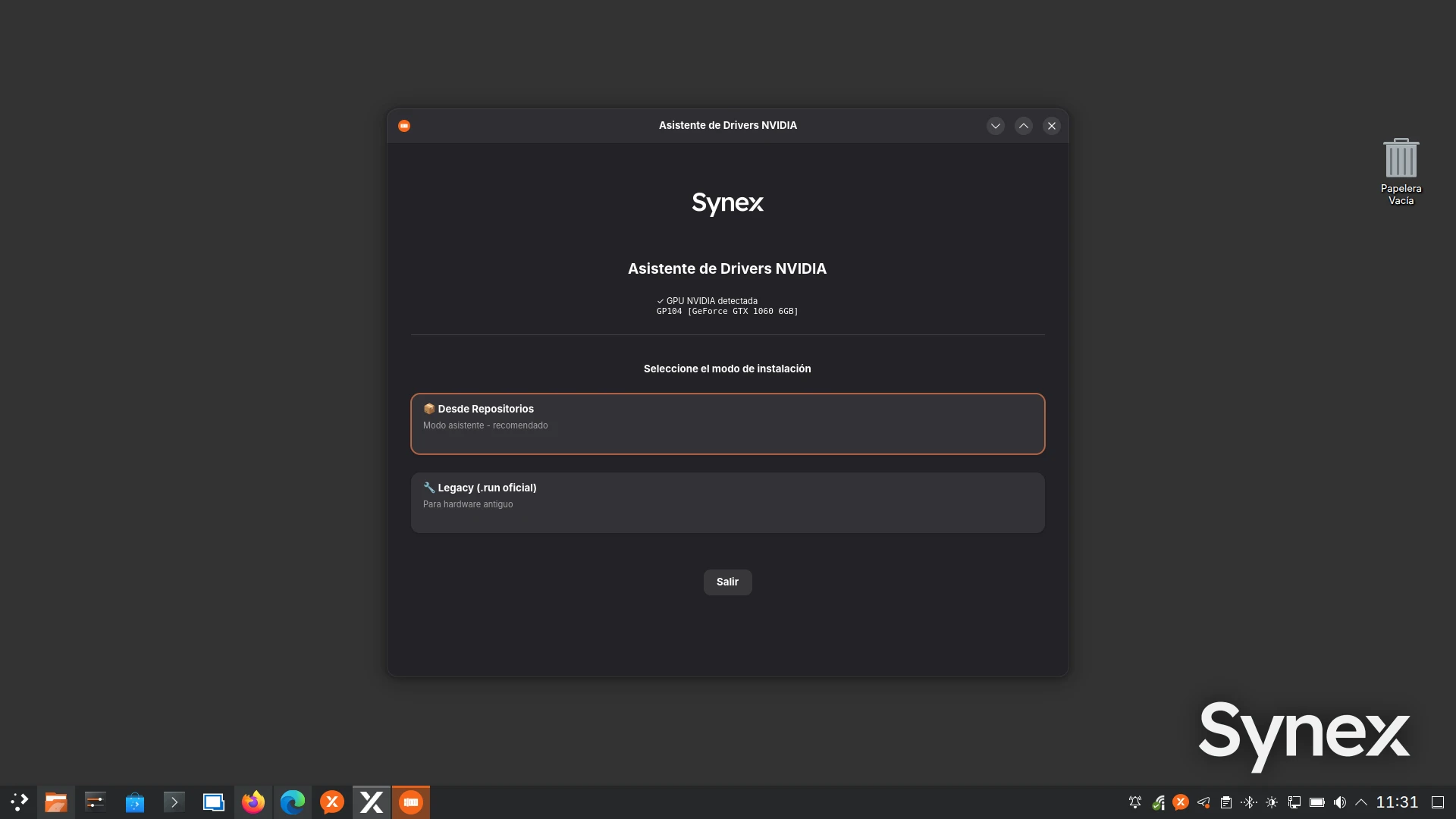
We have recently updated synex-nvidia-helper-gui, a tool developed to make one of the historically most delicate tasks in Linux desktop distributions easier: correctly installing the proprietary NVIDIA driver.
The goal of this tool is to reduce the complexity of the process without hiding the important decisions. Synex NVIDIA Helper runs directly from Synex Center, under the Tools menu, and is automatically installed on first launch if it was not previously installed. When started, the helper detects the presence of NVIDIA hardware; if no compatible GPU is found, it reports the situation and ends the process. From that point on, it automates the tasks required to prepare the system, install the driver, configure the kernel modules, and rebuild the initramfs.
The tool was designed to work on both X11 and Wayland sessions, also taking into account specific cases such as GNOME with GDM, where NVIDIA requires additional adjustments to provide a proper Wayland experience.
This post accompanies the demonstration video published on our YouTube channel, where we show how the assistant works and the recommended criteria for choosing the correct installation mode.
Two installation modes
Synex NVIDIA Helper offers two clearly differentiated paths.
The first one is the repository-based mode, intended for users with modern NVIDIA hardware. This workflow uses packages provided through the corresponding repositories and relies on nvidia-driver-assistant to detect the recommended installation. The assistant downloads and installs the required components, shows the suggested packages to the user, and, once the operation is confirmed, completes the driver installation.
The second one is Legacy mode, intended for NVIDIA cards that require specific branches of the official driver. In this case, the tool directly downloads the corresponding .run installer from NVIDIA, prepares the system, installs build dependencies, configures DKMS, disables nouveau when appropriate, enables nvidia-drm modeset=1, rebuilds the initramfs, and updates GRUB.
The separation between both modes is important: not all NVIDIA hardware should be installed in the same way, and using the wrong driver branch may cause installation failures, boot problems, or loss of graphics acceleration.
Repository-based mode
The repository-based mode is the recommended workflow for modern NVIDIA hardware, especially on the stable edition of Synex.
This mode is mainly intended for GeForce GTX 16 series cards and newer, such as GTX 1650, GTX 1660, RTX 20, RTX 30, RTX 40, and more recent families. In these cases, the system can rely on the modern driver available from repositories and maintain a more natural integration with the package system used by Synex and other Debian-based distributions.
During this workflow, Synex NVIDIA Helper performs the following tasks:
- updates APT package indexes;
- installs basic dependencies such as
wgetandca-certificates; - installs the corresponding keyring and adds the NVIDIA repository to the system;;
- installs
nvidia-driver-assistant; - runs hardware detection;
- shows the suggested packages before continuing;
- installs the toolchain and kernel headers;
- adds the required NVIDIA modules to the initramfs;
- performs the final installation through APT.
This method is the most recommended option for users with recent hardware who want an installation integrated with the system. When using this workflow, the NVIDIA repository is added to the system through its corresponding keyring, so future updates for the installed packages can be managed through APT along with the rest of the system.
As a general rule, we recommend using this workflow preferably on Synex stable. In the case of Synex semi-rolling, since it is based on Debian testing, we recommend using Legacy mode exclusively, avoiding the combination of the repository-based workflow with a system whose kernel, headers, and NVIDIA package stack may change more frequently.
Legacy mode
Legacy mode is intended for cases where the repository-based driver is not the best option, or where it simply does not apply due to the age of the hardware. It is also the recommended option for Synex semi-rolling, where it is preferable to use NVIDIA’s official installer and manually control the driver branch.
In this mode, the user manually selects one of the driver branches available in the assistant. Currently, Synex NVIDIA Helper includes branches 595, 580, 470, 390, and 340.
This workflow uses NVIDIA’s official .run installer. For that reason, before starting the installation, the assistant prepares the system with the dependencies required to compile the kernel module, installs headers, configures DKMS, blocks nouveau, and applies the required adjustments so the NVIDIA driver is available from boot.
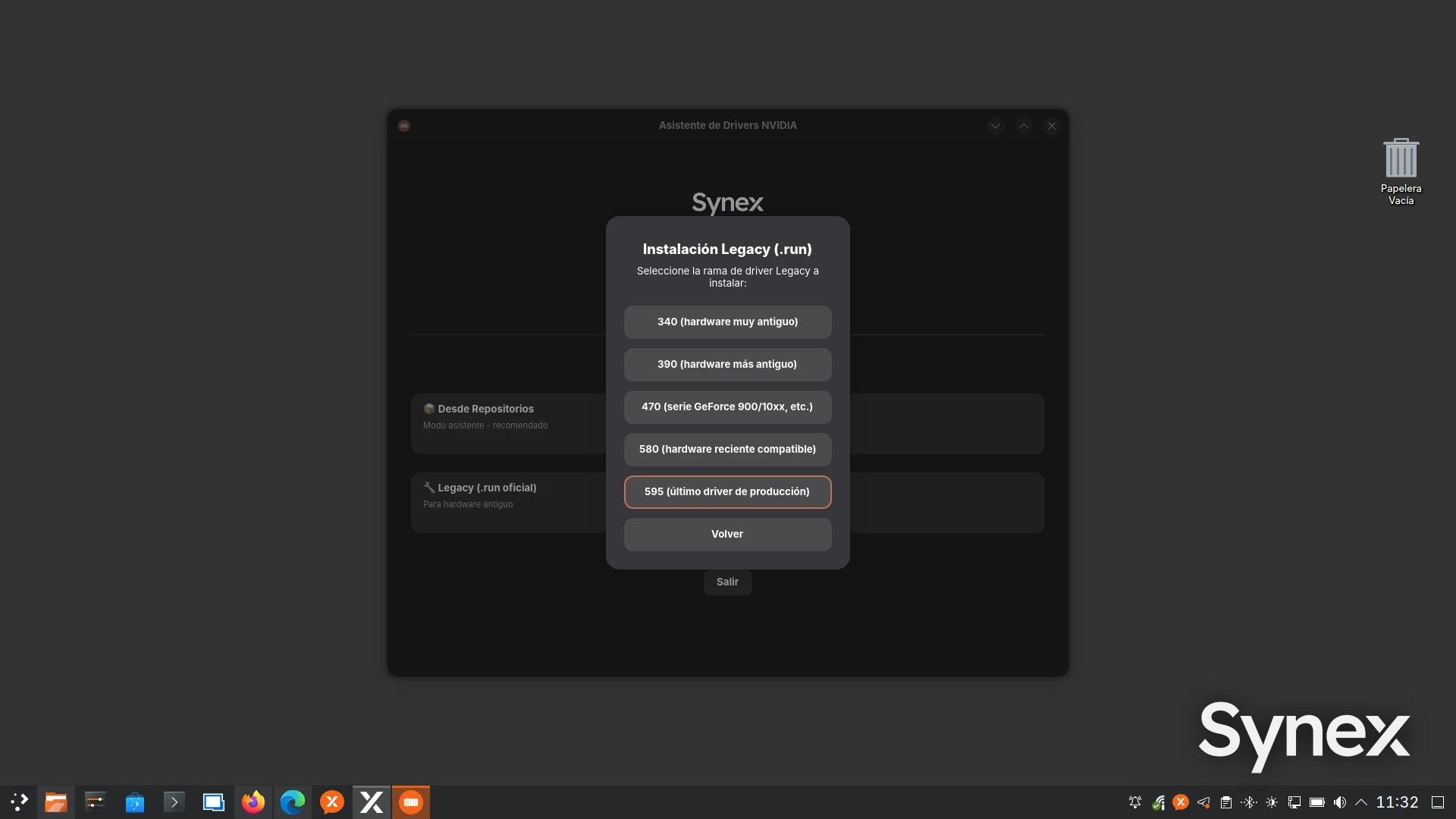
For GeForce 16 series cards and newer, such as GTX 1660, GTX 1650, and GTX 1630, it is also possible to use Legacy mode with branch 595, especially if the user wants to try NVIDIA’s official installer instead of the repository-based workflow.
For GeForce 10 series cards and older, such as GTX 1060, GTX 1070, or GTX 1080, the Legacy workflow should be used, selecting the appropriate driver branch for each model. For example, the GeForce GTX 10 line can use driver 580, as shown in the demonstration video.
For older cards, it will be necessary to choose earlier branches such as 470, 390, or 340, depending on the specific compatibility of each product.
An important point is that, by using DKMS, every time the kernel is updated, the system will automatically rebuild the NVIDIA modules so they are available for the new kernel, without manual user intervention.
Before installing, we always recommend checking the exact compatibility of the GPU model on NVIDIA’s official websites:
https://www.nvidia.com/en-us/drivers/unix
NVIDIA’s driver page also notes that many Linux distributions provide their own NVIDIA driver packages in native format, which may integrate better with each distribution’s package system. That is precisely why Synex NVIDIA Helper offers both paths: repository integration when appropriate, and Legacy mode when the hardware or use case requires it.
X11 and Wayland compatibility
Synex NVIDIA Helper was developed with both current graphical scenarios in mind: X11 and Wayland.
On modern installations, especially with GNOME, KDE Plasma, and other environments moving toward Wayland, installing the NVIDIA module alone is not enough. It is also necessary to ensure that nvidia-drm is configured with modeset=1, an important condition for the driver to work properly in Wayland sessions.
The assistant applies this configuration automatically through a modprobe file and adds the required NVIDIA modules to the initramfs:
nvidianvidia_modesetnvidia_uvmnvidia_drm
In the specific case of GNOME with GDM, the helper also applies the necessary adjustment to allow Wayland with NVIDIA, preventing GDM from disabling that session by default.
With this, Synex aims to offer a more direct experience both for users who prefer X11 and for those who want to use Wayland.
A simple but transparent assistant
Synex NVIDIA Helper does not try to turn driver installation into a black box. The tool shows progress, saves a technical log to /tmp/nvidia-install.log, and makes it possible to clearly identify which method was used and which packages or components were installed.
This is especially important for a tool that works with kernel modules, initramfs, DKMS, and graphics configuration. In case of an error, the user or the support team can review the log and understand at which stage the problem occurred.
This approach follows the general direction of Synex: offering a simple experience for the end user, without losing technical control or diagnostic capability.
Demonstration video
The demonstration video shows the installation on a Synex 13 u7 system with an NVIDIA GeForce GTX 1060 graphics card. For this case, Legacy mode was used with driver 580, showing the recommended workflow for this hardware generation.
Final recommendations
For users with GeForce GTX 16, RTX 20, RTX 30, RTX 40, or newer cards, we recommend starting with the repository-based mode on Synex stable. This workflow keeps the installation integrated with APT and is the option most aligned with the system.
For users who need to use NVIDIA’s official installer, or who have cards that require a specific branch, Legacy mode allows manually choosing from the available branches.
For GeForce GTX 10 and older cards, Legacy mode is the recommended path, always selecting the branch compatible with the exact GPU model.
As always, we recommend checking NVIDIA’s official compatibility information before installing the driver, especially on older hardware or systems with hybrid graphics configurations.
With this tool, we continue moving forward with our goal: to offer a system that is simple to use, but prepared to practically solve the real problems that appear on the Linux desktop.