

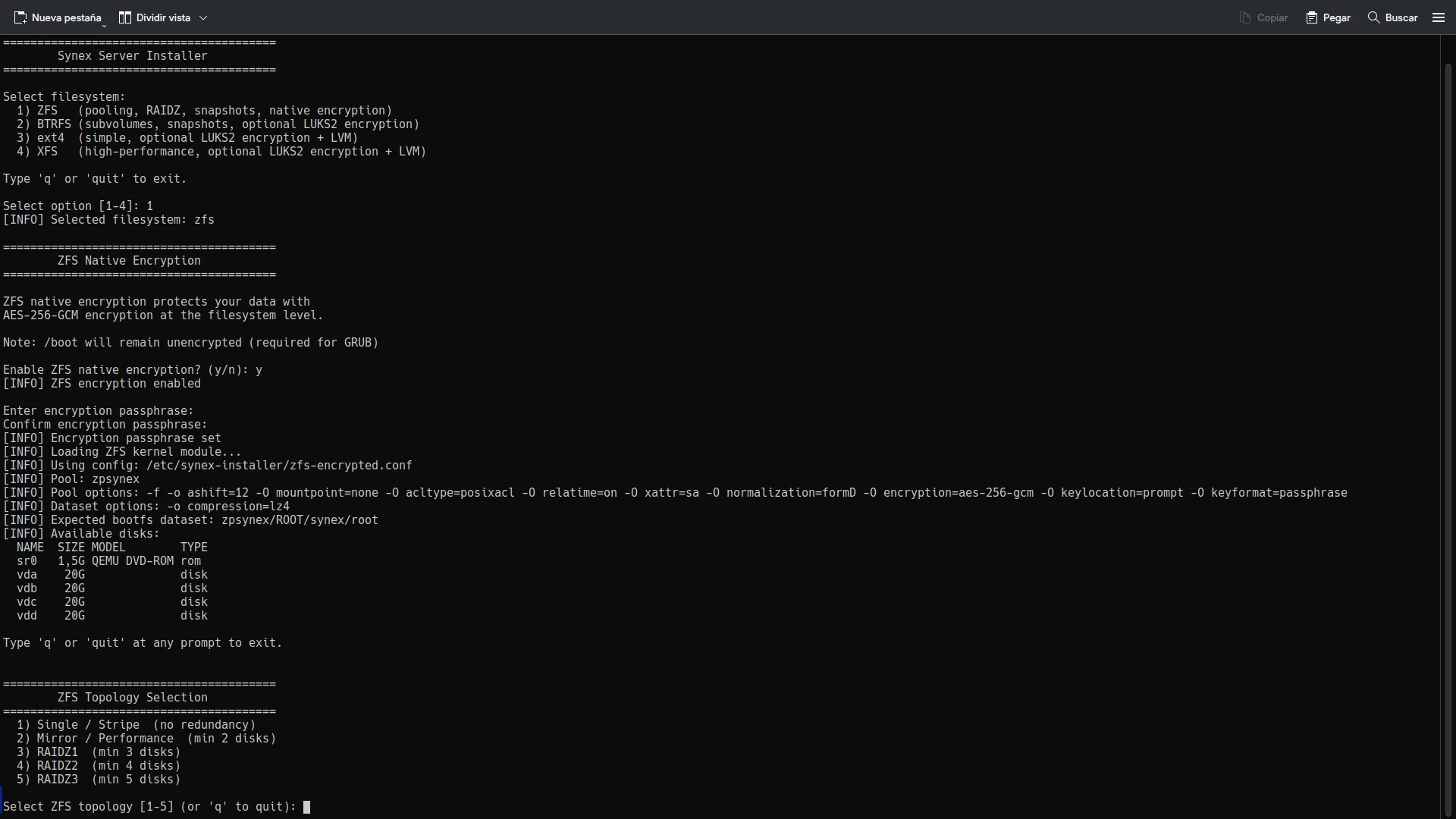
We are pleased to announce Synex Server 13 R2, an update that represents the project’s turning point. What began as synex-zfs-installer in version R1 —a specialized tool for ZFS deployments— has evolved into synex-installer: a comprehensive installation system that addresses the most demanding storage requirements of the enterprise environment.
From synex-zfs-installer to synex-installer
When we developed synex-zfs-installer for Synex Server 13 R1, the goal was clear: offer ZFS as a storage option overcoming the limitations of the traditional Debian Installer. That first version fulfilled its purpose, but during development we identified similar opportunities with other filesystems that deserved the same attention.
The transition to synex-installer was not simply adding support for additional filesystems. It was the recognition that different server scenarios require different approaches to storage, and that a unified tool could offer optimized configurations for each case without sacrificing flexibility.
The result is an installer that presents four filesystem options —ZFS, BTRFS, ext4, and XFS— each with installation workflows specifically designed to maximize their strengths. It is not a generic installer that treats all filesystems the same way, but a tool that understands the unique characteristics of each one and configures the system accordingly.
For those who prefer the traditional workflow, Debian Installer remains available as a consolidated alternative.
ZFS: complete enterprise capabilities
The ZFS implementation in synex-installer goes significantly beyond what synex-zfs-installer offered. Version R1 only supported single-disk installations. R2 introduces the full spectrum of ZFS topologies that enterprise organizations require.
Available topologies
Single/Stripe (no redundancy): For a single disk or multiple disks in stripe configuration (RAID0). Stripe distributes data across all disks maximizing capacity and performance, but without any redundancy. The loss of any disk means total data loss. Reserved for scenarios where performance is the priority and data can be rebuilt from other sources.
Mirror/Performance (full redundancy): Replicates data on two or more identical disks, equivalent to RAID1. The configuration is intelligent according to the number of disks:
- 2 disks: simple mirror
- 4, 6, 8… disks (even): striped mirrors (RAID10), combining performance and redundancy
- 3, 5, 7… disks (odd): striped mirrors + 1 automatic hot spare
The hot spare remains available in the pool for immediate replacement. When a disk fails, a simple `zpool replace` activates the spare and ZFS automatically begins resilvering (data reconstruction) to restore pool redundancy.
RAIDZ1, RAIDZ2, RAIDZ3: Distributed parity with 1, 2, or 3 disk fault tolerance respectively. Unlike traditional RAID that operates at the block level, RAIDZ is integrated directly into ZFS. The filesystem knows the data structure and can make intelligent decisions about verification and repair.
This architecture eliminates the “write hole” that affects traditional RAID5/6, where an interruption during writing can leave the array in an inconsistent state. In RAIDZ, transactions are atomic: they either complete fully, or are not applied.
Minimum requirements: RAIDZ1 needs 3 disks, RAIDZ2 needs 4, RAIDZ3 needs 5.
Native ZFS encryption
The installer incorporates AES-256-GCM encryption directly into ZFS. Unlike LUKS solutions that encrypt blocks without filesystem knowledge, ZFS encryption operates at the dataset level. This means that:
- Each dataset can have its own encryption key
- Datasets inherit encryption from the parent automatically
- Compression occurs before encryption, maximizing efficiency
- Pool metadata remains unencrypted, improving performance
ZFS encryption is configured during pool creation. Datasets created later automatically inherit the configuration. The system requests the passphrase during boot, before mounting the root filesystem.
An important technical note: ZFS encryption requires disabling compatibility=grub2 in pool options. This option limited ZFS to features that GRUB 2 could read directly, but it was unnecessary because /boot resides on a separate ext4 partition where GRUB can access kernels and initramfs without problem.
Hierarchical datasets
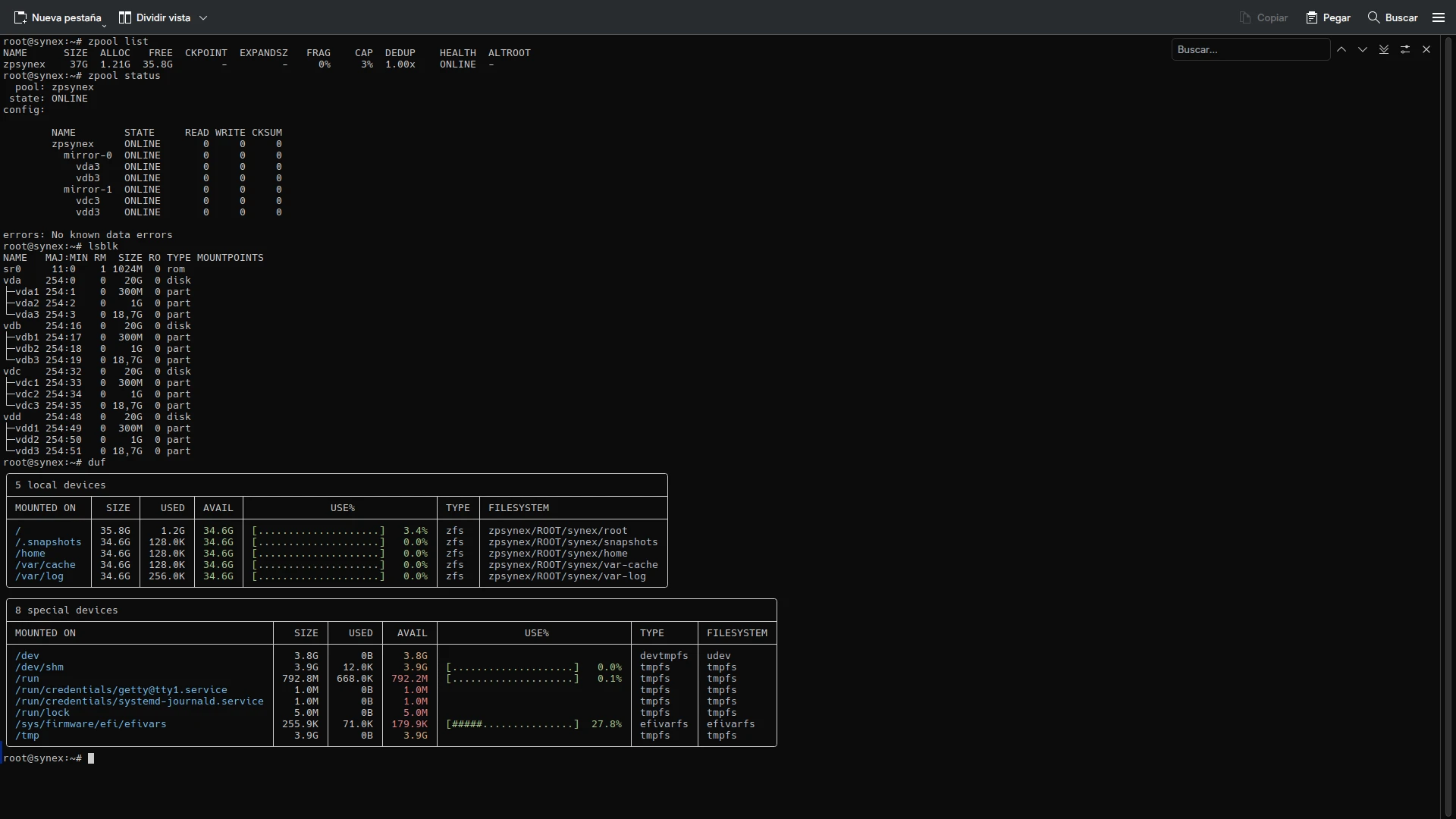
The dataset structure follows the ROOT/synex scheme established in R1, designed to maximize flexibility in server environments:
- ROOT/synex/root: Root system with manual mounting required during boot
- ROOT/synex/home: User data with automatic mounting
- ROOT/synex/var-cache: System cache, allows independent retention policies
- ROOT/synex/var-log: Logs with aggressive LZ4 compression
- ROOT/synex/snapshots: Dedicated mount point for system snapshots
This separation allows granular administration: applying specific quotas to home, configuring differentiated log retention, creating snapshots of the complete system or individual components without affecting other datasets.
Boot redundancy with synex-boot-redundancy
In ZFS multi-disk configurations, the data pool has full redundancy, but /boot and the EFI partition traditionally reside only on the first disk. If that disk fails, the system does not boot despite the data remaining accessible in the pool.
synex-boot-redundancy solves this problem by replicating /boot and EFI to all pool disks, installing GRUB on each one. The process occurs automatically during installation:
- The installer creates EFI and
/bootpartitions on all pool disks (Phase 1) - Initially only formats and uses the first disk’s partitions
- At the end of installation, it executes
synex-boot-redundancy sync --reformaton the installed system - This tool:
- Formats the boot/EFI partitions of secondary disks
- Replicates
/bootcontent to each disk - Replicates EFI content to each disk
- Patches each disk’s
grub.cfgwith its corresponding UUID - Installs GRUB in removable mode on each EFI partition
The result: any pool disk can boot the system independently. If the primary disk fails, the UEFI firmware can boot from any other array disk without manual intervention.
BTRFS: subvolumes and simplified encryption
BTRFS shares philosophy with ZFS regarding snapshots and subvolume management, but with a different approach to encryption. While ZFS integrates encryption natively, BTRFS delegates this function to LUKS2.
Subvolume structure
The installer creates an automatically optimized subvolume configuration:
- @: System root mounted at
/ - @home: User data in
/home, isolated to facilitate reinstallations - @log: System logs in
/var/log, allows independent snapshot policies - @snapshots: Snapshot storage in
/.snapshots
This separation provides flexibility comparable to traditional LVM schemes, but with native BTRFS capabilities. Snapshots are instantaneous and consume space only for modified blocks thanks to copy-on-write. Compression (ZSTD level 1 by default) is applied transparently reducing disk usage, and each subvolume can have independent quotas and policies.
LUKS2 encryption for BTRFS
Unlike ext4/XFS which require LVM for post-encryption flexibility, BTRFS does not need that additional layer. Subvolumes already provide the capability to divide and manage storage space dynamically.
The installer creates a LUKS2 container directly over the root partition, and inside that container formats BTRFS with its subvolumes. A single passphrase protects all storage, and BTRFS manages space distribution internally.
This approach is technically elegant: LUKS provides block-level encryption, BTRFS manages space and snapshots, and there are no redundant abstraction layers.
ext4 and XFS: flexible partitioning with LVM
For ext4 and XFS, the installer offers interactive partitioning where the administrator defines the structure according to the server’s specific needs. Mount points, partition sizes, optional swap inclusion: each decision remains in the hands of those who know the deployment requirements.
The role of LVM in encryption
A fundamental design decision was to include LVM when ext4 or XFS are combined with LUKS2 encryption. The reason is architectural: these filesystems are “flat”. One partition equals one fixed-size filesystem. Without LVM, encrypting means creating fixed-size partitions inside LUKS, losing all post-installation flexibility.
LVM solves this by introducing a volume management layer inside the encrypted container:
- A single passphrase unlocks all storage
- Logical volumes can be resized hot
- New volumes can be created as needed
- Storage can be extended by adding disks to the volume group
- LVM snapshots provide backup/rollback capability
It is the industry standard: RHEL, Rocky, AlmaLinux, Fedora Server use LUKS + LVM for ext4/XFS encryption for these same reasons. The additional complexity is justified by the flexibility it provides in enterprise environments where storage requirements evolve.
Refined installation experience
Beyond the technical storage capabilities, synex-installer introduces significant improvements in the user experience during the installation process.
Intuitive navigation
The installer allows going back at any point in the workflow using the ‘b’ option. Selected the wrong filesystem? Go back. Want to review the ZFS topology before confirming? Go back. This flexibility eliminates the frustration of having to restart the entire installer for an error in a previous step.
Configuration summaries
Before any destructive operation, the installer presents a complete summary of what it is about to do:
- Selected filesystem
- Topology (in case of ZFS)
- Disks that will be erased
- Encryption configuration (if applicable)
- Hostname, network configuration, timezone
The user has the opportunity to review, and if something is not correct, can go back to adjust it. Only after an explicit confirmation (“YES” in uppercase) does the installer proceed with irreversible changes.
Validations at each step
Validations occur immediately, not at the end of the process:
- Duplicate disks in selection? Immediate error
- RAIDZ topology with insufficient number of disks? Error with the required minimum
- Encryption passphrase less than 8 characters? Error with explanation
- Network configuration with invalid IP? Error with suggestions
This approach prevents the user from advancing with invalid configurations that would fail later in the process.
Complete system configuration
The installer is not limited to copying the system and formatting disks. It configures the complete system:
- Hostname: With RFC 1123 validation, generates
/etc/hostnameand/etc/hosts - Network: DHCP or static IP with CIDR format, gateway and DNS validation
- Timezone: Interactive selection with search and filtering, more than 400 zones available
- Locales: Detects live environment configuration and applies it to the installed system
- Keyboard: Persistent configuration from live boot
- SSH: Regenerates host keys to avoid using those from the live system
The installed system is ready for production immediately after the first boot.
Use cases and recommendations
The variety of options may raise the question: what filesystem to use for what scenario?
ZFS with RAIDZ: file servers, critical database storage, environments where data integrity is paramount. Continuous checksum verification and self-repair capability justify the investment in additional disks for parity.
ZFS with Mirror: application servers where read performance is critical and redundancy is needed. ZFS with VDEVs in Mirror (equivalent to RAID 10) offers the best performance/redundancy balance.
BTRFS: development and staging, servers where frequent snapshots are valuable but without the complexity and hardware demands of ZFS. Transparent compression significantly reduces disk usage in projects with many text files and source code.
ext4: the standard par excellence for environments where simplicity and efficient resource usage are key. It is the best choice for systems with limited hardware resources or public clouds where filesystem maturity guarantees full compatibility with any backup and monitoring tool on the market.
XFS: Big Data repositories, streaming servers, large-scale databases, and massive storage nodes. Thanks to its Allocation Groups architecture, XFS allows multiple CPU threads to write simultaneously to the same volume without bottlenecks. It is the standard in corporate environments (like RHEL) for its ability to handle petabyte filesystems and multi-terabyte files with minimal fragmentation and near-instant recovery after failures.
System updates
This version includes all cumulative package updates available in Debian Trixie repositories up to the build date. Critical security patches for server environments are incorporated, along with the optimized kernel for the amd64 architecture.
Synex Control is updated to version 1.1.1 with significant improvements in navigation and user experience: bilingual breadcrumb system, improved input handling with support for ESC and special keys, and automatic pagination for long outputs. ServerHub remains at its current version. Both tools function independently of the filesystem chosen during installation.
Availability
Synex Server 13 R2 is available for immediate download. As always, we recommend verifying checksums of downloaded images before creating the installation media.
The leap from synex-zfs-installer to synex-installer represents the project’s maturation toward a comprehensive solution for enterprise storage. The ability to choose among four filesystems, each with optimized configurations and encryption adapted to their characteristics, positions Synex Server as a serious alternative for critical infrastructure.
Download Synex Server 13 R2 from here.