

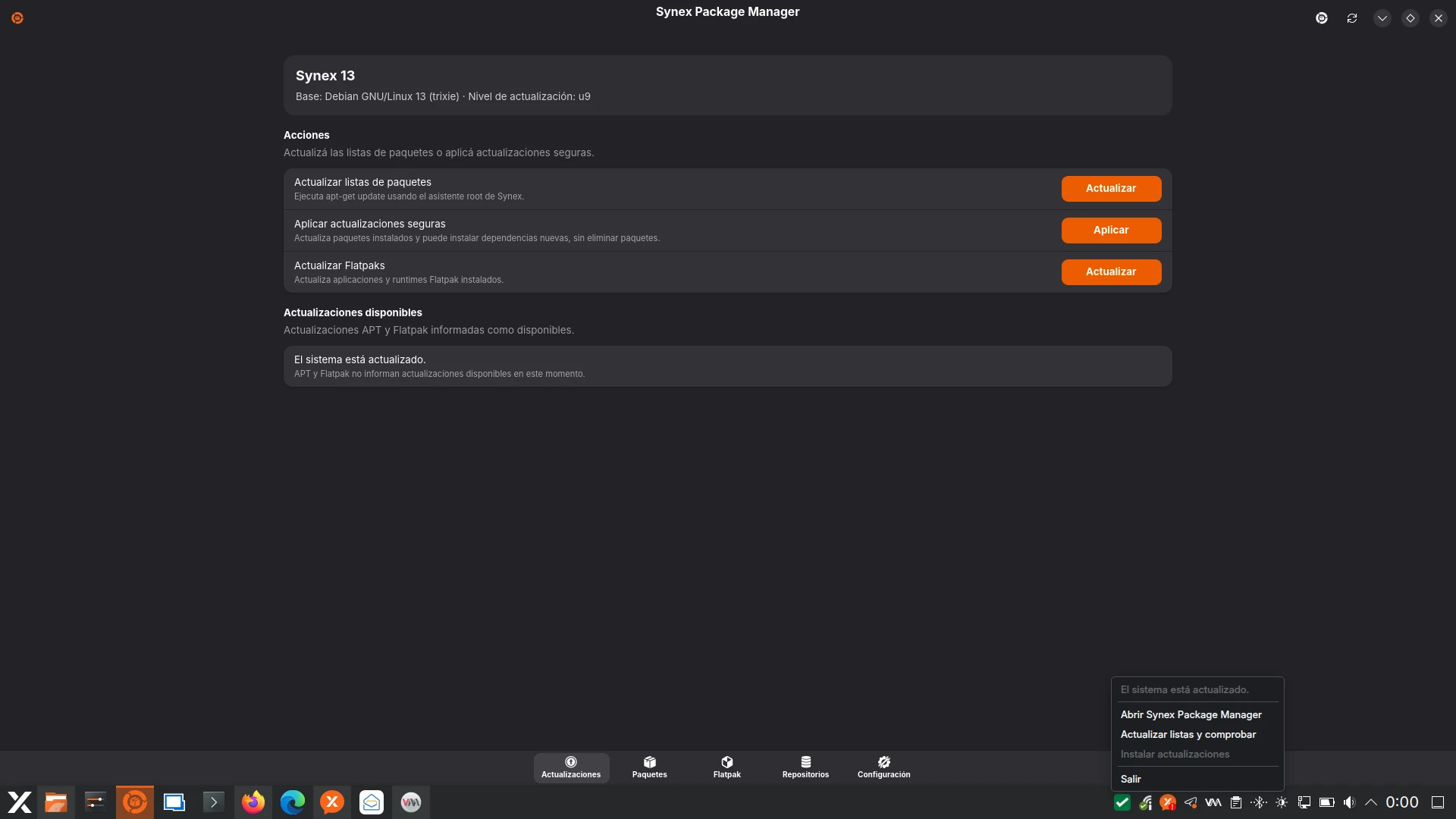
We are pleased to announce the release of Synex 13 u9, an update that consolidates a structural change in the software management experience of Synex Desktop. The main component of this version is the adoption of Synex Package Manager (SPM) as a unified tool to manage packages, repositories, and Flatpak across all project editions, bringing the work previously validated in the semi-rolling images to the stable branch.
Synex Package Manager: one tool for all editions
Until this version, graphical software management in Synex Desktop depended on the chosen desktop environment. KDE Plasma included Discover, GNOME offered GNOME Software, and MX Package Installer appeared as an additional complement. Users switching between editions encountered different interfaces, different flows, and behaviors that were not always coherent across desktops.
Synex 13 u9 replaces this fragmented set with a single tool: Synex Package Manager. KDE Plasma, GNOME, XFCE, MATE, and LXDE now share exactly the same application for all software management tasks. The experience is consistent regardless of the desktop: same interface, same flows, same capabilities, same documentation.
IceWM is excluded from this unification. Due to its minimalist nature and the absence of a complete graphical environment, it maintains a management scheme based on terminal tools, consistent with the philosophy of that edition.
What SPM unifies
Synex Package Manager concentrates capabilities that previously required multiple tools into a single application:
- APT updates with review and apply workflow
- Search and installation of deb packages
- APT repository management with a catalog of known repositories and support for custom sources
- Flatpak applications: installation, updates, category browsing, and runtime maintenance
- Update indicator in the system tray, with configurable automatic refresh
- Centralized configuration page for application and service preferences
The practical consequence for the user is that learning to manage software in Synex means learning a single tool. The consequence for the project is that maintenance, documentation, and improvements concentrate on a single component developed within the Synex ecosystem.
Access for advanced users
This change does not eliminate flexibility. Traditional terminal tools (apt, flatpak, dpkg) remain available without restrictions. SPM offers a clear and integrated graphical path for the most common tasks, while advanced users retain full access to command-line tools as they prefer.
For a detailed overview of all Synex Package Manager features, you can download the datasheet from here.
Default software catalog review
The adoption of SPM as the central manager allowed reviewing what software is included by default and what remains available on demand.
Repositories removed from default configuration
Until this version, Synex included by default third-party repositories for Microsoft Edge, Visual Studio Code, OnlyOffice, and Zabbix. These sources were incorporated directly into the system configuration and also appeared as additional software in the Calamares netinstall.
With SPM available, these repositories were removed from system defaults. Additional source management is now handled from Synex Package Manager, which features a broad catalog of known repositories (including VSCodium as a free alternative to VS Code, in addition to Microsoft, Google, Signal, TeamViewer, AnyDesk, Tailscale, GitHub CLI, several browsers, Docker, and others). As of today, SPM offers a catalog with 24 repositories, which in turn feature branch detection: that is, if a repository is only available for the Debian stable branch, it will only be shown in Synex Desktop Stable, and not in Semi-rolling.
As a consequence, software from these repositories no longer appears in the Calamares netinstall either. The conscious decision is that the incorporation of each repository remains an explicit action by the administrator, avoiding default configurations that may not suit all users.
New packages in the netinstall
The additional software screen of the Calamares installer incorporates additional options oriented to productivity and development: AbiWord as a lightweight word processor alternative to LibreOffice, Gnumeric as a low-resource spreadsheet, and Code::Blocks, KDevelop, and GNOME Builder as development environments. These inclusions prioritize lightweight, low-requirement alternatives, aligned with the diversity of editions that Synex offers.
Renewed system identity: synex-release 1.1.0
The synex-release package advances to version 1.1.0 with a significant addition: the use of dpkg-divert to take over files traditionally provided by Debian. This allows presenting Synex's identity consistently without modifying upstream packages or breaking Debian's update flow.
Files managed through divert include /usr/lib/os-release (with ID=synex and ID_LIKE=debian to preserve compatibility with scripts and third-party repositories), /etc/issue, /etc/issue.net, and the MOTD template in /usr/share/base-files/. The VERSION_CODENAME=trixie field is intentionally preserved to avoid breaking external repository scripts that detect the Debian version through this value.
The divert mechanism ensures that when Debian updates its base files, the Synex versions remain in place, and when uninstalling synex-release, Debian's original files automatically return to their location. The operation is completely reversible and does not generate conflicts during system updates.
Synex's own KDE theme in the Plasma edition
The KDE Plasma edition incorporates the Synex theme (org.kde.synex.desktop), previously validated in the semi-rolling images and now available in the stable branch. The synex-kde-theme package consolidates the distribution's visual identity into a formal look-and-feel: custom panel layout (pinned launchers, Kickoff hover-to-switch categories, 24-hour time-only clock, and 44px panel height), the SynexDark color scheme, the synex-breeze login theme for SDDM, and Synex's dynamic wallpaper with light and dark variants in 16:9, 16:10, and 21:9 resolutions.
This work replaces configurations previously applied in a scattered way through live-build, consolidating them into a maintainable package that is separable from the original KDE packages.
Updated components
This version includes all cumulative package updates available in Debian Trixie repositories up to the build date. Security patches and bug fixes subsequent to version u8 are incorporated.
Main components include Linux kernel 6.12.90, Mesa 25.0.7, PipeWire 1.4.2, WirePlumber 0.5.8, Firefox ESR 140.11.0, and OpenSSL 3.5.6. The installer remains based on Calamares 3.3.14 with calamares-settings-synex 1.0.25.
The KDE Plasma edition includes Plasma Desktop 6.3.6, KWin 6.3.6, and stable-series KDE applications. The GNOME edition incorporates GNOME Shell 48.7, GDM3 48.0, and GNOME Control Center 48.4. The XFCE edition remains on the 4.20 series with xfce4-panel 4.20.4, xfce4-session 4.20.2, xfwm4 4.20.0, and Thunar 4.20.2. The MATE edition uses the 1.26 series with mate-panel 1.27.1, mate-session-manager 1.26.1, marco 1.26.2, and caja 1.26.4. The LXDE edition includes lxpanel 0.11.1, lxsession 0.5.6, and lxde-common 0.99.3. The IceWM edition remains on the 3.7.4 series.
Synex Package Manager is included in version 0.8.4, and the synex-branding 1.1.0 and synex-release 1.1.0 packages accompany the system identity renewal.
Availability and download
Synex 13 u9 is available for immediate download in its six desktop editions: KDE Plasma, GNOME, XFCE, MATE, LXDE, and IceWM. As always, we recommend verifying checksums of downloaded images before creating the installation media.
Users of previous Synex 13 versions can update their system through the standard package manager. To try and set Synex Package Manager as the default manager, they will need to install it through their current manager by searching for synex-package-manager. Afterwards, they can safely remove the previous graphical managers.
Final words
The adoption of Synex Package Manager as the unified manager represents a fundamental step for the project. Beyond the specific improvement in user experience, this decision consolidates a component of Synex's own ecosystem instead of depending on generic solutions that did not always adapt well to the goal of coherence across editions.
As always, we invite you to join discussions at forum.synex.ar, report any issues you encounter, and share your experiences with Synex 13 u9.
Download Synex 13 u9 from here.