

We are pleased to announce the availability of Synex 13 u14. This release focuses its main improvements on three project tools: the installer, software management, and SSH connections.
Calamares: normal installation and the new Advanced ZFS mode
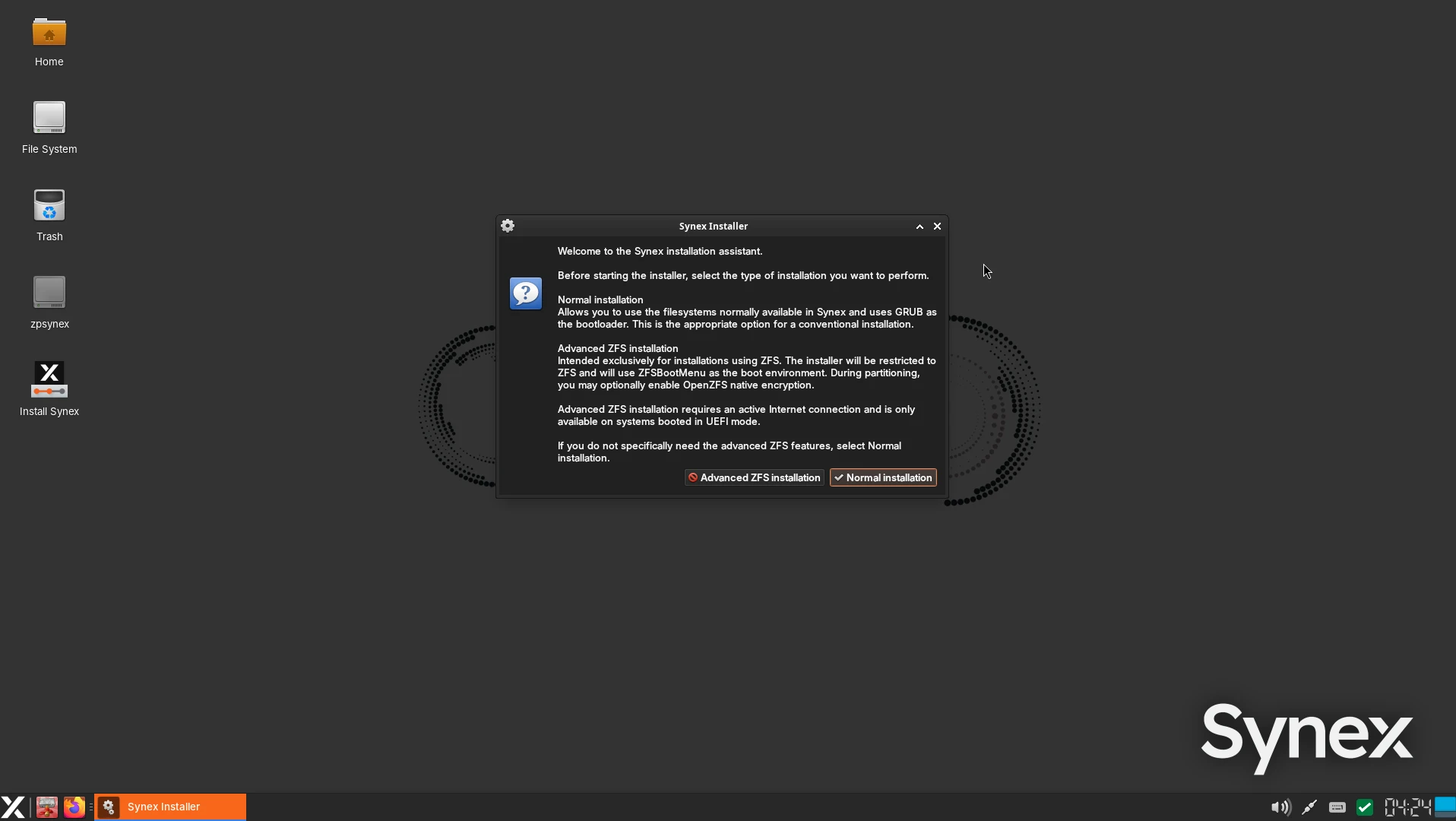
The installer now offers a choice between two workflows before launching Calamares. The selection is available in Spanish and English, separating the usual installation process from a new alternative dedicated to ZFS.
| Mode | Features |
|---|---|
| Normal installation | Supports installation on ext4, XFS, or Btrfs, with LUKS2 encryption options, as well as unencrypted ZFS. Uses GRUB as the bootloader. |
| Advanced ZFS | Uses ZFS exclusively, integrates ZFSBootMenu as the boot manager, and allows OpenZFS native encryption to be enabled. It can also be used without encryption. |
The main change is that Synex can now be installed directly on ZFS with native encryption through Calamares. The advanced workflow configures storage and booting together, using an OpenZFS compatibility profile that supports encryption.
For encrypted installations, the process validates the key and integrates its file into the initramfs with restrictive permissions. This allows booting to continue after the initial unlock in ZFSBootMenu without requesting the same passphrase again. When installing without encryption, key configuration is skipped and ZFSBootMenu is retained.
Advanced ZFS mode requires UEFI boot and an Internet connection to complete the ZFSBootMenu integration. Secure Boot must be disabled for this workflow. IceWM retains its reduced package selection and does not include ZFS support.
Important when enabling native ZFS encryption: the passphrase must contain at least 8 characters. Currently, Calamares may allow you to continue with a shorter passphrase without displaying an error at that point; however, OpenZFS will reject it when creating the storage, causing the installation to fail later. This requirement applies to the encryption passphrase.
Validation also covered reinstalling on a disk previously used with encrypted ZFS, followed by a new unencrypted ZFS installation. The reuse of stale UEFI entries was corrected so that ZFSBootMenu points to the EFI partition of the current installation.
The update also includes visual integration adjustments for Calamares on GNOME, using the Qt GTK3 platform theme with the dark Adwaita variant.
Synex Package Manager 1.5.0: interactive terminal and package repair
Synex Package Manager replaces its operation output viewer with an integrated VTE-based terminal. In addition to improving text rendering, colors, and scrolling, this terminal allows users to answer questions presented by certain packages during installation or removal.
This covers both configuration scripts that require interaction and debconf dialogs. SPM includes GNU Dialog with an appearance inspired by Debian Whiptail, allowing these configuration steps to be completed within the application itself.
The integration preserves authorization and controls for privileged operations. For interactive transactions, logs retain operation information and results without storing terminal transcripts or user responses.
More tools in Maintenance
The Maintenance section has been reorganized to group import and export functions separately from package operations. It now provides three additional actions:
- Complete pending configurations: detects packages that require intervention through a dpkg audit and allows their pending configuration to run in the interactive terminal.
- Repair APT dependencies: analyzes the system state, simulates the repair, and presents the changes before requesting confirmation. The workflow rejects plans that would remove packages, install older versions, or affect protected packages.
- Remove dependencies that are no longer needed: provides a standalone APT autoremove cleanup operation, with a preview, confirmation, and warnings when kernels are among the packages to be removed.
Repairs recheck the system state before execution and include safeguards against concurrent package operations. Dependency repair also preserves APT's native confirmation within the terminal.
Automatic security update configuration can now install unattended-upgrades when needed, presenting the proposed operation beforehand. If installation or activation fails, the previous configuration is preserved.
These improvements build on the existing APT, Flatpak, repository, and software list management features. SPM also retains the restrictions specific to Synex Immutable.
Synex Connections 0.4.0: split sessions and encrypted backups
Synex Connections expands its workspace with a split view that allows two simultaneous SSH terminals for the same connection profile. Each tab can also include a local terminal, with adjustable panes and independent scrolling.
This makes it possible, for example, to keep one remote session for running tasks and another for checking logs, alongside a terminal on the local computer. Pane state is managed per tab, and focus handling, reconnections, and process shutdown have been improved.
Export and restore connections across computers
Version 0.4.0 introduces portable backups in .synex-connections files, protected by a user-chosen passphrase and AES-256 symmetric encryption through GnuPG.
The backup brings together profiles, available stored passwords, and the required SSH identity keys. Portability extends across secret managers: a backup created using KWallet can be restored on a desktop using GNOME Keyring or another Secret Service-compatible implementation.
Backup data is processed in memory during encryption and decryption, without writing an intermediate plaintext copy. Newly selected SSH keys are copied into application-managed storage with restrictive permissions; existing profiles using external keys remain compatible and can include them in the backup.
Import detects duplicate profiles and allows users to skip them or explicitly add them as additional connections. Importing the same backup again does not recreate profiles that are already present. If a restore cannot be completed, the application rolls back changes made to profiles, keys, and credentials.
Synex Connections 0.4.0 is included in KDE Plasma, GNOME, XFCE, MATE, LXDE, Openbox, and COSMIC. IceWM retains its reduced application selection.
System updates
This release includes the cumulative package updates available in the Debian 13 Trixie repositories up to the build date, with Linux kernel 6.12.113, systemd 257.13, OpenSSL 3.5.7, GRUB 2.14, OpenZFS 2.3.9, btrfs-progs 6.14, Mesa 25.0.7, PipeWire 1.4.2 with WirePlumber 0.5.8, and Firefox ESR 153.6.0. Editions with Flatpak support include version 1.16.6.
Installation uses Calamares 3.3.14 and calamares-settings-synex 1.0.35. The images include Synex Package Manager 1.5.0, Synex Snapshots 0.5.1, and grub-btrfs 4.14+git20260805-1synex1; editions with ZFS also include grub-zfs 0.1.0.
By edition: KDE Plasma 6.3.6 with Dolphin 25.04.3; GNOME Shell 48.7 with GDM3 48.0 and Nautilus 48.3; XFCE 4.20, with xfce4-panel 4.20.4, xfce4-session 4.20.2, xfwm4 4.20.0, and Thunar 4.20.2; MATE, with mate-panel 1.27.1, Marco 1.26.2, and Caja 1.26.4; LXDE 13.0, with LXPanel 0.11.1, lxsession 0.5.6, and PCManFM 1.4.0; IceWM 3.7.4; Openbox 3.6.1 with tint2 17.0.1; and COSMIC Epoch 1.8.0.
Availability
Synex 13 u14 is available for immediate download in all 8 editions. As always, we recommend verifying the checksums of downloaded images before creating the installation media.
Download Synex 13 u14 from SourceForge.