

We are pleased to announce the publication of new Synex Semi-rolling images, the branch based on Debian Testing. This update brings three novelties: the COSMIC edition advances to version 1.5.0, synex-snapshots is added for Btrfs snapshot management from a graphical interface, and the installer fixes an issue that prevented completing the installation on machines with BIOS/MBR boot.
COSMIC 1.5.0
The COSMIC edition of Synex Semi-rolling moves to version 1.5.0, the latest release published by System76 for its Rust-written desktop environment. The update reaches the complete stack: the Wayland compositor, the panel and its applets, the settings centre, the session manager and the first-party applications that ship alongside the environment.
As with every revision, Synex applies its visual identity on top of the original environment: orange accent, Inter and Hack typefaces, its own wallpaper and a dock pre-configured with the system tools. Third-party GTK applications are steered towards a coherent dark theme, so that the desktop keeps a uniform appearance when installing software outside the default set.
The COSMIC packaging for Debian and Synex remains public in the cosmic-synex repository, available for inspection or for anyone who wants to build it themselves.
synex-snapshots: management and safe restoration of Btrfs snapshots
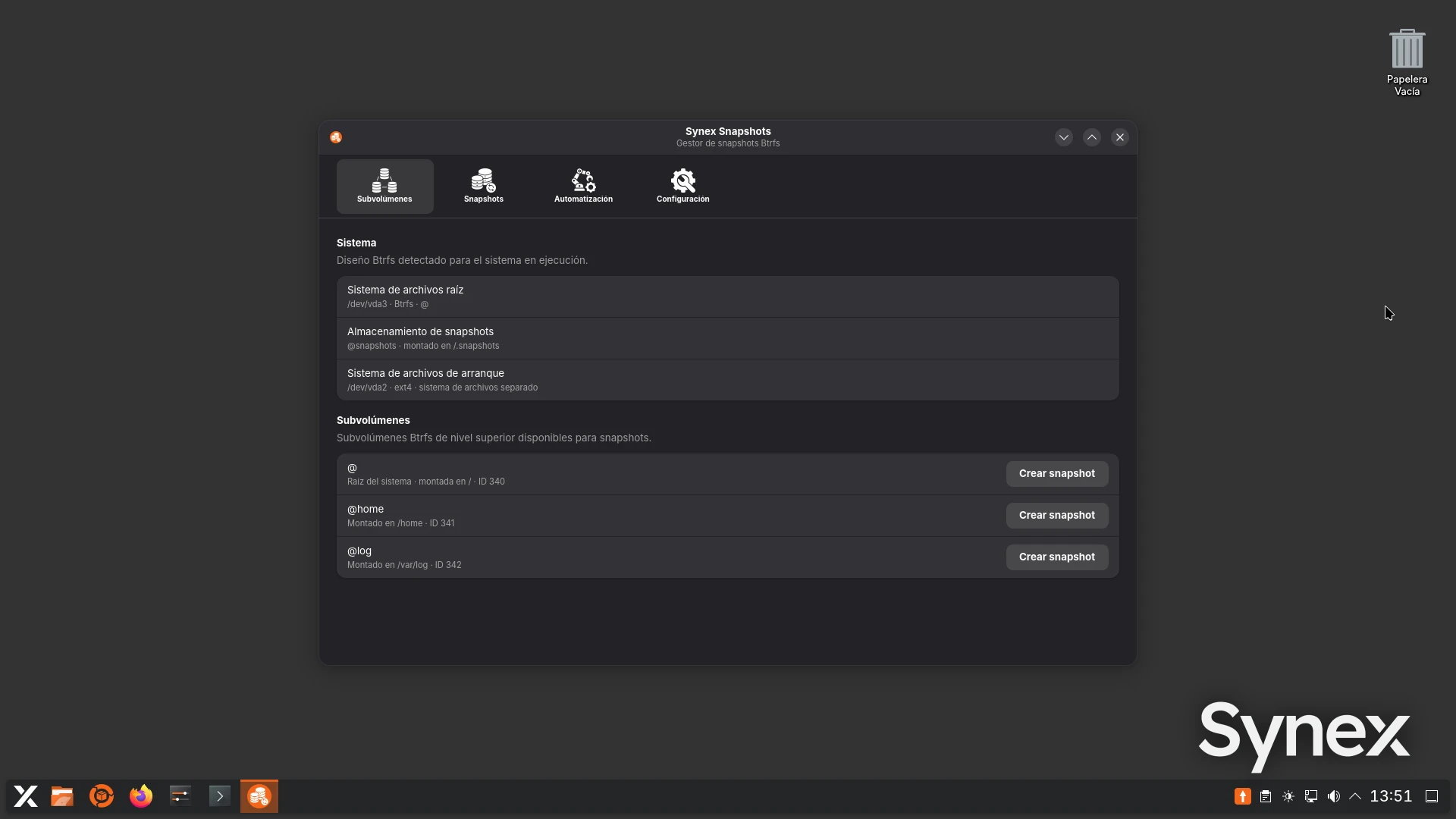
This version debuts synex-snapshots, a new graphical application developed with GTK4 and libadwaita to create, manage and restore snapshots on installations that use Btrfs.
The tool automatically detects the Btrfs layout of the running system and identifies its top-level operational subvolumes. Snapshot storage is kept separate in a dedicated subvolume, @snapshots, mounted at /.snapshots, avoiding any mixing of snapshots with the subvolumes normally used by the system.
Synex Snapshots allows working with two modalities. Single snapshots make it possible to preserve the state of an individual subvolume, while Full ones generate a consistent set of all the detected operational subvolumes. Snapshots are created in read-only mode and each set incorporates its own manifest with metadata, identifiers and the information needed to later validate the operation. The interface also differentiates the purpose of each set, separating manually created snapshots from those generated automatically as a safety measure before a restoration.
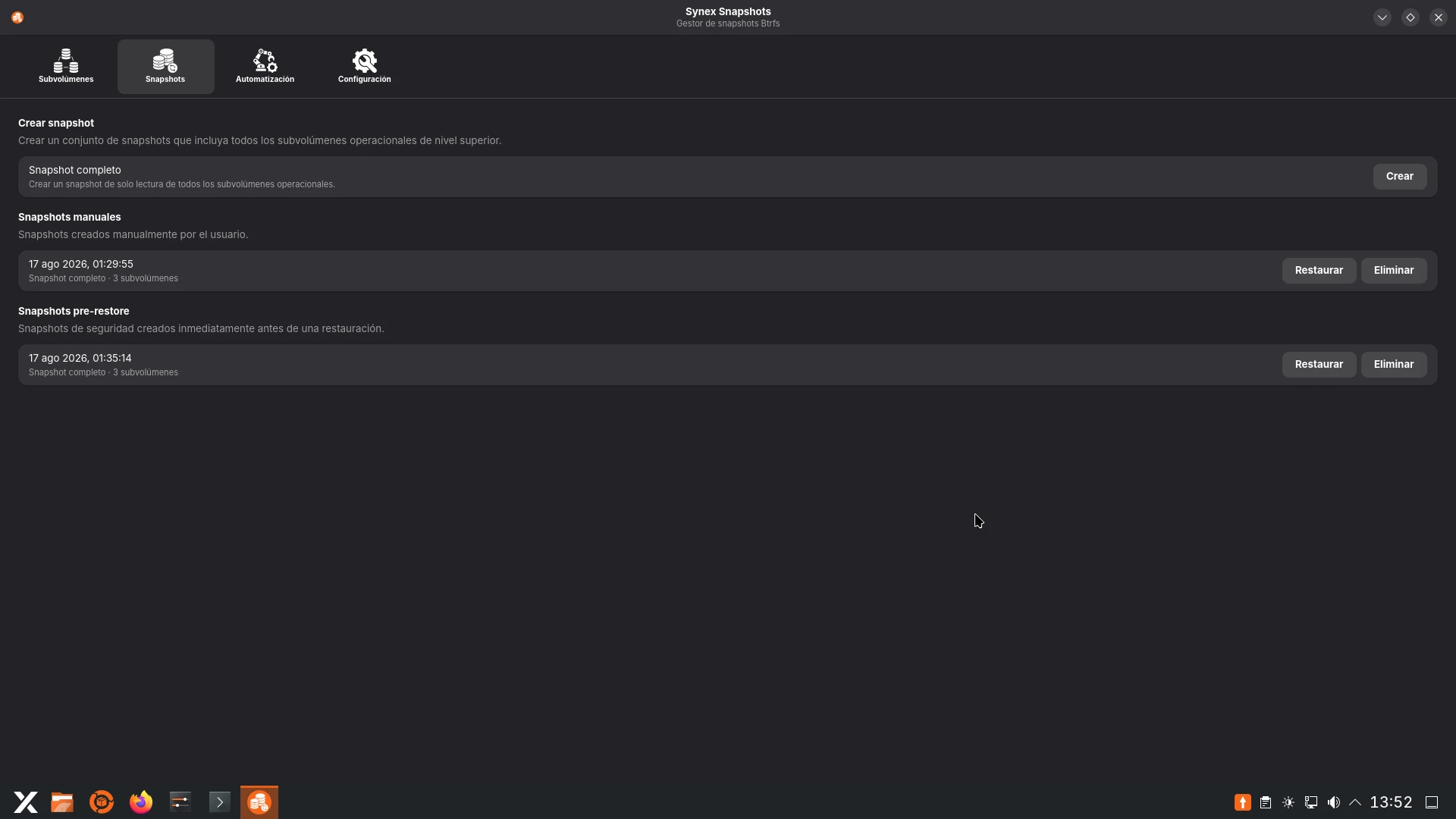
Restoration is one of the aspects where the safety design was most concentrated. Before modifying the system, Synex Snapshots performs a preflight validation of the selected set and automatically creates a new snapshot of the current state, identified as Pre-restore. This set is not subject to automatic deletion: it is kept until the user decides to remove it manually, providing an additional point of return in the event of an unwanted restoration.
The replacement of subvolumes is not carried out by immediately destroying the existing state either. The newly restored subvolumes are first prepared independently and, while the restoration is applied, the current subvolumes are temporarily moved to a transactional backup state. Only afterwards are the new subvolumes placed in their canonical locations. In this way, the previous state remains available during the critical phase of the operation and can be used to revert a controlled failure before the change is completed.
Once the restoration has been applied, rebooting the system is mandatory. Synex Snapshots records the state of the operation and prevents starting a second restoration during the same boot, avoiding the chaining of changes on a system that has not yet been started from the new subvolumes. After the reboot, a systemd oneshot service verifies that the system has indeed booted from the new state, finalises the transaction and automatically removes the temporary subvolumes of the previous installation along with the internal data of the operation. The Pre-restore snapshot, by contrast, remains available to the user.
In Full restorations, the goal is to return the operational set to the state represented by the selected snapshot, not simply to restore isolated files. This makes it possible to maintain coherence between the different subvolumes that form part of the system.
Sets that include the root subvolume also guarantee coverage of /boot. When /boot is part of the Btrfs root subvolume itself, it is naturally included in the snapshot. When it uses a separate ext4 partition, Synex Snapshots creates and validates a zstd-compressed archive that allows its content to be restored as well. In this latter scenario, /boot/efi is preserved throughout the operation.
All actions requiring administrative privileges are kept separate from the graphical interface and go through a root helper limited to specific operations, authorised through Polkit. This way, the graphical application continues running as the normal user and only elevates privileges when an operation genuinely requires it.
Synex Snapshots 0.1.0 additionally incorporates an English and Spanish interface, desktop integration, and a foundation prepared to keep expanding its snapshot management capabilities in future versions.
On where new developments debut
synex-snapshots arrives first on Semi-rolling, and that decision responds to a criterion the branch has been consolidating: it is the place where the project's new developments enter circulation and accumulate real-world use before joining the stable branch. It was already applied with the COSMIC edition, which is incorporated into Stable once a cycle has been completed without significant issues, and from now on it will be the intended path for the tools the project develops.
For those using Synex 13, this means that synex-snapshots will become available once the work is mature and backed by use on Semi-rolling. In the meantime, anyone who wants to try it right now, and contribute their experience, will find the tool in these images.
Installation on machines with BIOS/MBR boot
An issue that prevented completing the installation on machines booting in legacy BIOS mode has been fixed. The cause was the absence of grub-pc-bin on the installation medium, without which the installer could not write the bootloader to the MBR.
The images now include both grub-pc-bin and grub-efi-amd64-bin, so that the installation completes correctly in both boot modes.
Main components
These images were built on Debian Testing and include Linux kernel 7.1.8, systemd 261.2, OpenSSL 3.6.3, Mesa 26.1.5, PipeWire 1.6.8, WirePlumber 0.5.15, Firefox ESR 140.13.0 and Flatpak 1.18.1. Installation is handled by Calamares 3.4.2 with calamares-settings-synex 1.0.29, and all editions include Synex Package Manager 1.2.3 and synex-snapshots 0.1.0.
By edition: KDE Plasma 6.7.2 with KWin 6.7.2 and KDE Applications 26.04.0; GNOME Shell 50.3 with GDM3 50.1 and Nautilus 50.2.2; XFCE 4.20, with xfce4-panel 4.20.8, xfce4-session 4.20.4, xfwm4 4.20.0 and Thunar 4.20.9; and COSMIC Epoch 1.5.0.
Availability
The new Synex Semi-rolling images are available for immediate download in the KDE Plasma, GNOME, XFCE and COSMIC editions. As always, we recommend verifying the checksums of the downloaded images before creating the installation medium.
Download Synex Semi-rolling from here.