

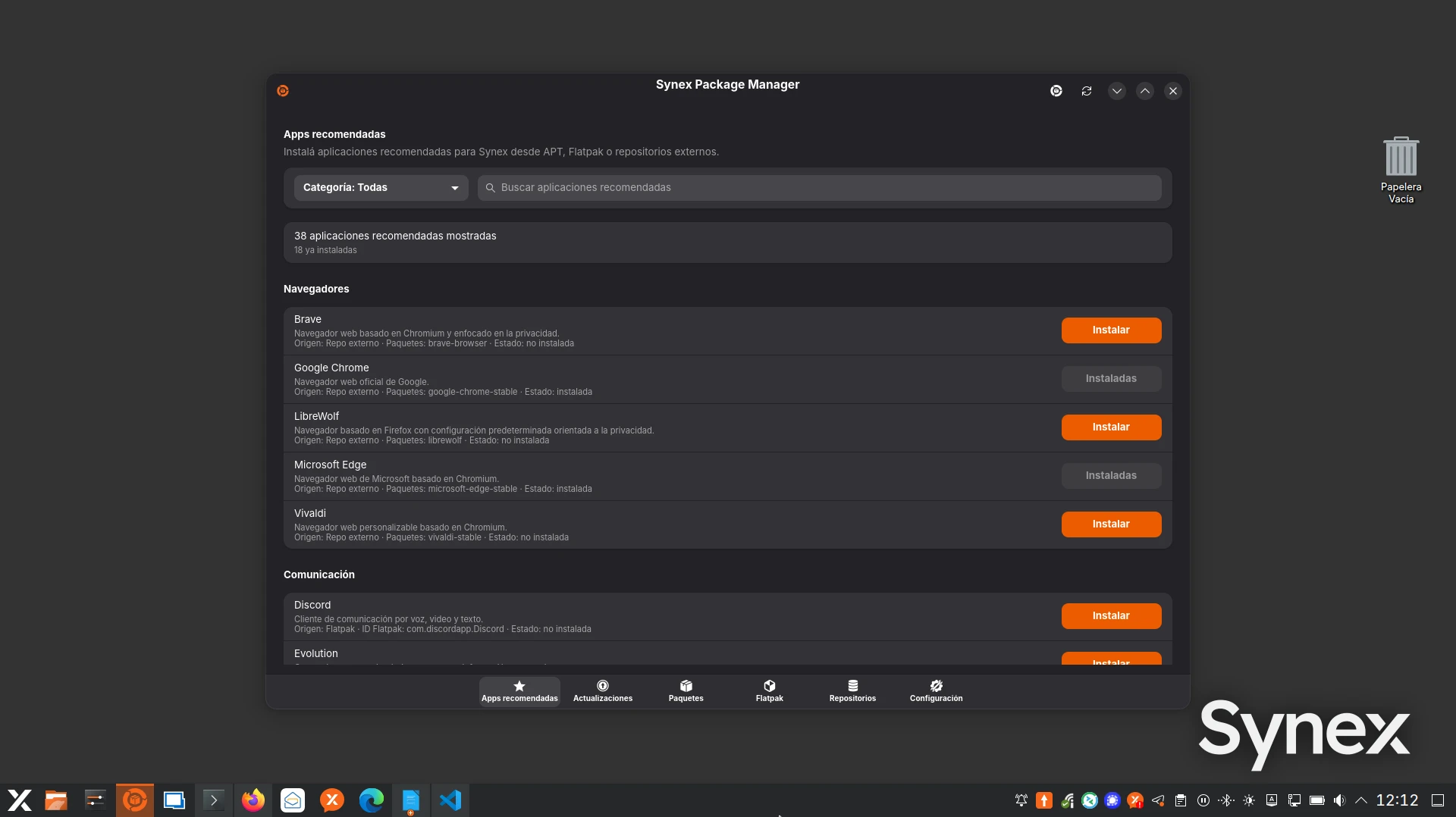
We are pleased to announce the release of Synex 13 u10. This update continues the evolution of Synex Package Manager as the central software management tool, incorporating functionality that significantly simplifies the installation of common applications, along with bringing the system base up to date and consolidating the project's most recent desktop editions.
Synex Package Manager: evolution since u9
The previous stable edition (u9) incorporated Synex Package Manager 0.8.4 as the unified software manager. Since then, the application advanced steadily to version 1.2.2 that arrives with u10. Much of this work was previously validated in the semi-rolling images, and now consolidates in the stable branch.
Throughout these versions, relevant capabilities were incorporated: local .deb package installation with metadata inspection and prior simulation, a redesigned repositories page with a table that allows viewing and deleting APT entries in a controlled way, configurable unattended updates (security only, safe upgrade, or safe upgrade plus Flatpak), importable and exportable software lists to replicate application selections between systems, and optional purge and autoremove handling in APT removals.
The most notable addition, however, is the new recommended applications section.
Recommended applications: one-click installation
Synex Package Manager incorporates a recommended applications page: a curated catalog of frequently used software, grouped by use case, ready to install directly from the interface. The goal is that the user does not need to know in advance whether an application comes from the Debian repositories, a third-party repository, or Flatpak: the tool takes care of resolving the origin and executing the corresponding flow.
The behavior adapts to the nature of each application. When the software comes from an external repository, the tool adds the repository (with its corresponding keyring), updates the APT indexes, and installs the package, all under a single authorization request that chains the three operations. The user does not have to configure the source manually or remember the setup steps for each repository.
When the application is distributed as Flatpak, the flow contemplates the case of systems where Flatpak is not yet configured: if support is not present, the tool installs the flatpak package, enables support, configures the Flathub and Flathub Verified remotes (system-wide and for the user), refreshes the AppStream metadata, and only then installs the application. For the user, all this happens behind a single install action.
This functionality reduces to one click tasks that traditionally required following provider-specific instructions, editing source files, managing GPG keys, or preparing the Flatpak environment from scratch. The application selection draws from a catalog maintained within the Synex ecosystem, prioritizing common desktop software.
COSMIC and Openbox editions consolidated
During the u9 cycle we incorporated two new desktop editions to the project, announced at the time as independent releases: Openbox and COSMIC. With u10, both become fully integrated into the regular release cycle of Synex Desktop.
The COSMIC edition arrives in this version with COSMIC Epoch 1.1.0. The most relevant change in this version of COSMIC is the incorporation of cosmic-monitor, the environment's new system monitor, which becomes an official part of COSMIC releases. The edition maintains the Synex theme and branding integration out of the box, and shares the same base and the same set of in-house tools as the rest of the editions.
The Openbox edition continues to offer a lightweight and highly configurable environment, oriented to users who prefer a minimalist window manager over a complete desktop, while maintaining coherence with the Synex management tools.
Calamares: refined ZFS component management
The Calamares installer incorporates a refinement in component management according to the chosen filesystem. When the installation is performed on a filesystem other than ZFS (ext4, BTRFS, or XFS), the installer now removes the ZFS packages and their orphaned dependencies, leaving the installed system without components that do not correspond to the selected configuration.
This behavior complements the existing inverse logic, where an installation on ZFS removes cryptsetup and the related components that do not apply to that configuration. The criterion is the same in both cases: the installed system includes only the components relevant to the chosen filesystem, without leaving unnecessary packages.
Updated components
This version includes all cumulative package updates available in Debian Trixie repositories up to the build date. Security patches and bug fixes subsequent to version u9 are incorporated.
Core components include Linux kernel 6.12.94, systemd 257.13, Mesa 25.0.7, PipeWire 1.4.2, WirePlumber 0.5.8, OpenSSL 3.5.6, and Firefox ESR 140.12.0. The installer remains based on Calamares 3.3.14 with calamares-settings-synex 1.0.29. Synex Package Manager is included in version 1.2.2.
Availability and download
Synex 13 u10 is available for immediate download in its desktop editions: KDE Plasma, GNOME, XFCE, MATE, LXDE, Openbox, COSMIC, and IceWM. As always, we recommend verifying checksums of downloaded images before creating the installation media.
Final words
The new recommended applications section represents another step toward the goal of simplifying software management in Synex Desktop. Tasks that previously required specific technical knowledge are now resolved in one click, without sacrificing the conservative and transparent approach that characterizes Synex Package Manager.
As always, we invite you to join discussions at forum.synex.ar, report any issues you encounter, and share your experiences with Synex 13 u10.
Download Synex 13 u10 from here.