

We are pleased to announce the release of Synex 13 u8, an update focused on two key areas for real-world system usage: NVIDIA driver maintenance and recovery of installed systems from the live environment. This release continues to consolidate Synex as a practical, simple Debian-based distribution aimed at solving concrete tasks without adding unnecessary complexity.
Synex NVIDIA Helper GUI: safer installation and updates
The graphical NVIDIA helper receives a significant update, especially for systems using legacy drivers installed through the official .run installer.
Until now, the legacy flow was mainly intended for initial installation. On systems where the NVIDIA driver was already loaded by the current graphical session, reinstalling or updating within the same branch could fail or behave unclearly, especially when the nvidia-drm module was already in use.
Synex 13 u8 improves this behavior by adding detection of the installed version and comparison against the target version included for each legacy branch. The helper can now distinguish between different scenarios:
Updated driver already installed: if the installed version matches the target version of the selected branch, the helper avoids reinstalling the driver unnecessarily.
Update available within the same branch: if an older version is detected within the same legacy branch, the helper offers to update it.
Branch change: if the system has a different branch installed, the helper avoids performing an automatic cross-branch update. This type of change requires more explicit intervention, since moving from one legacy branch to another should not be treated as a minor update.
NVIDIA driver loaded in the current session: for updates within the same legacy branch, the helper adds support for running the installer with the driver in use through --allow-installation-with-running-driver, avoiding silent aborts or ambiguous behavior from the NVIDIA installer.
Clearer dialogs were also added for detection states: driver already updated, update available, different branch installed, and general driver detection states. The goal is for the user to understand what is happening before performing any sensitive operation on the graphical system. Finally, the latest production drivers were also added to the Legacy flow, for users who prefer to keep drivers outside NVIDIA’s official repositories.
Kernel and headers handling
The NVIDIA helper (synex-nvidia-helper-gui) also received important adjustments in how compilation dependencies are installed for the Legacy flow.
The unconditional installation of linux-headers-$(uname -r) was removed, since it could mark versioned kernel header packages as manually installed. Instead, the helper first checks for the existence of /lib/modules/$(uname -r)/build and only attempts to install versioned headers as a fallback when they are actually needed.
In addition, --no-upgrade was added when installing compilation prerequisites, preventing an NVIDIA driver installation from triggering a partial kernel or headers upgrade. This is especially important because NVIDIA modules must be compiled against the currently running kernel, not against a kernel that has just been installed but has not yet been booted. If the system has a pending kernel update, the driver will be installed for the kernel currently in use; when the user updates and boots into a new kernel, DKMS will rebuild the corresponding modules.
The linux-image-amd64 and linux-headers-amd64 metapackages remain marked as manual packages, while versioned headers installed as a fallback are marked as automatic. This decision keeps the package system clean and helps avoid unnecessary accumulation over time.
Finally, the helper’s log and state files were moved from /tmp to /var/log/synex-nvidia-helper-gui.*, making persistent diagnostics easier in case of installation, module compilation, or graphical configuration failures.
synex-chroot: recovery from the live environment
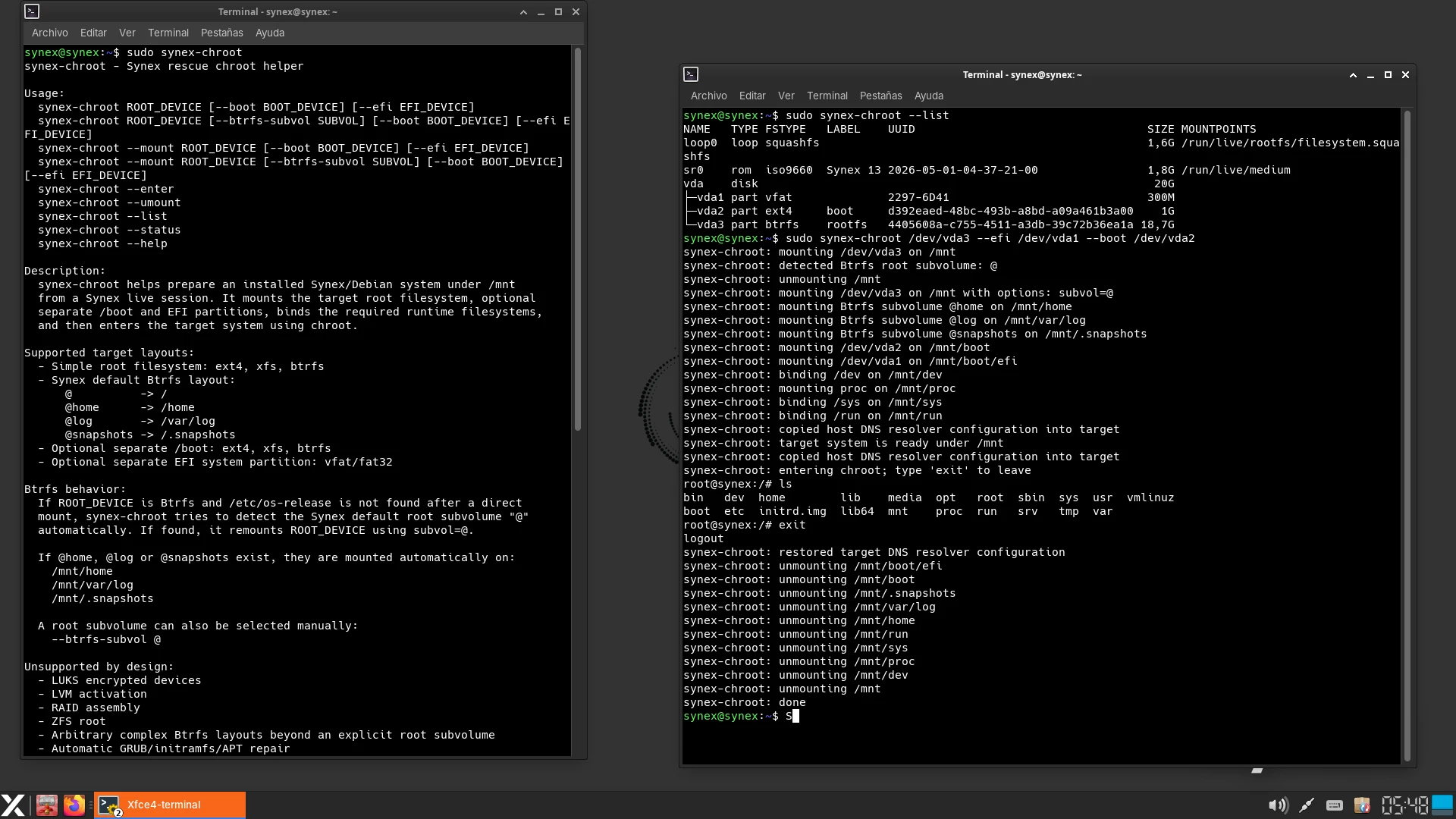
Synex 13 u8 includes synex-chroot, a dedicated CLI tool designed to simplify recovery tasks from the live environment.
This package was created as part of a design decision: removing the rescue mode provided by the Debian Installer. The d-i rescue mode was useful, but it required keeping a considerable part of the installer inside the ISO just to cover one specific recovery scenario. In practice, the Synex live environment already allows users to perform almost all necessary repair tasks: mounting partitions, inspecting files, repairing packages, rebuilding initramfs, or reinstalling GRUB.
However, one part of the rescue flow was still convenient: quickly and safely entering an installed system through chroot. synex-chroot covers exactly that space.
The tool allows the user to select or specify an existing installation, mount the required virtual filesystems, and enter the installed environment as if working from the system itself. When exiting, it automatically unmounts the mount points it used. It also includes options to re-enter an already mounted environment and to manually unmount it in case the user closed the terminal or needs to clean up the working environment.
In practical terms, synex-chroot is intended for tasks such as:
- Reinstalling or repairing GRUB.
- Rebuilding initramfs.
- Fixing APT or dpkg issues.
- Editing critical boot configurations.
- Inspecting an installed system that no longer boots correctly.
- Performing advanced maintenance from a live session.
The tool follows a simple philosophy: it does not replace the administrator’s technical knowledge, but removes repetitive and error-prone steps. Manually mounting /dev, /dev/pts, /proc, /sys, /run, entering the chroot, and then unmounting everything correctly is a common task, but also a common source of mistakes. synex-chroot automates that part so the user can focus on the actual repair.
Smaller ISO size, same recovery capabilities
Removing the Debian Installer rescue mode also has a direct impact on the size of the ISO images. In our tests, the reduction ranged from approximately 534 MB to 587 MB, depending on the edition. The impact varies slightly depending on the image, but in all cases it represents a considerable decrease in the final size.
This reduction does not mean losing recovery capabilities. On the contrary, Synex now relies on a strategy that is more consistent with its own design: using the complete live environment as a maintenance platform, while adding a specific, lightweight, dedicated tool to simplify tasks that previously depended on the d-i rescue flow.
The result is a lighter ISO, less component duplication, and a recovery experience that is more aligned with Synex.
System updates
Synex 13 u8 includes all cumulative package updates available in the Debian Trixie repositories up to the build date. Security patches and bug fixes released after Synex 13 u7 are included, along with the corresponding updates to the Synex ecosystem.
As in previous releases, users with existing installations can update through the standard package manager. Improvements to synex-nvidia-helper-gui and synex-chroot will be available through the Synex repository.
Availability and download
Synex 13 u8 is available for download in its six desktop editions: KDE Plasma, GNOME, XFCE, MATE, LXDE, and IceWM. As always, we recommend verifying the checksums of downloaded images before creating the installation media.
Final words
Synex does not aim to add visible complexity, but to better solve concrete problems. NVIDIA driver installation and updates are one of the areas where it is especially important to avoid risky or unwanted automatic decisions. Recovering systems from a live environment is another task where small mistakes can cost time.
With this release, Synex improves both fronts: a smarter and more conservative NVIDIA helper, a dedicated chroot tool for recovery, and a significant ISO size reduction by removing components that were no longer necessary within the current design.
Download Synex 13 u8 here.